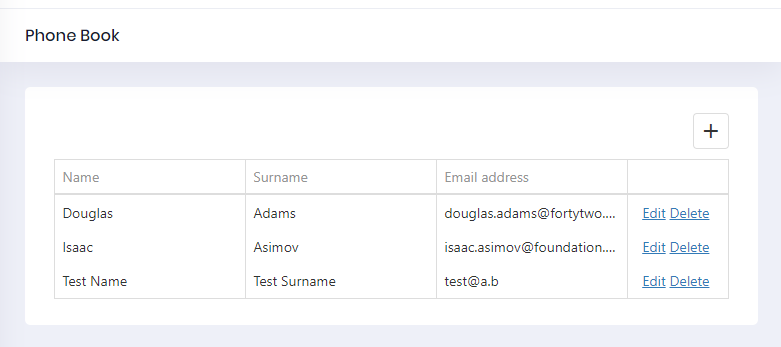
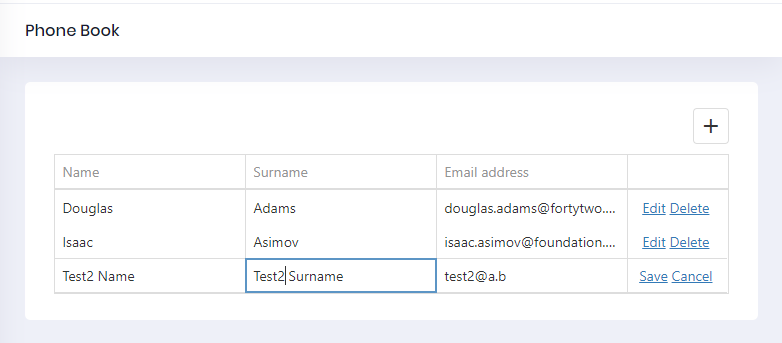
Editing a Person
Application Service
Let's add a DeletePerson method to the server side. We are adding it to the service interface, IPersonAppService::
Task EditPerson(EditPersonInput input);
And add the necessary DTO to transfer person's id, name, surname, and email.
public class EditPersonInput: EntityDto
{
    public string Name {get;set;}
    public string Surname {get;set;}
    public string EmailAddress {get;set;}
}
EntityDto is a shortcut of ABP if we only get an id value. Implementation (in PersonAppService) is very simple:
public async Task EditPerson(EditPersonInput input)
{
    var person = await _personRepository.GetAsync(input.Id);
    if (input.Name != null)
    {
        person.Name = input.Name;
    }

    if (input.Surname != null)
    {
        person.Surname = input.Surname;
    }

    if (input.EmailAddress != null)
    {
        person.EmailAddress = input.EmailAddress;
    }

    await _personRepository.UpdateAsync(person);
}
Service Proxy Generation
Since we changed server side services, we should re-generate the client-side service proxies via NSwag. Make server side running and userefresh.bat as we did before.
Component Script
Go to phonebook.component.ts and add update option to CustomStore:
import { Component, inject } from '@angular/core';
import { AppComponentBase } from '@shared/common/app-component-base';
import { appModuleAnimation } from '@shared/animations/routerTransition';
import { EditPersonInput, PersonServiceProxy } from '@shared/service-proxies/service-proxies';
import { LocalizePipe } from '@shared/common/pipes/localize.pipe';
import { SubHeaderComponent } from '@app/shared/common/sub-header/sub-header.component';
import { DxDataGridModule } from 'devextreme-angular';
import CustomStore from 'devextreme/data/custom_store';

@Component({
    templateUrl: './phonebook.component.html',
    animations: [appModuleAnimation()],
    imports: [SubHeaderComponent, LocalizePipe, DxDataGridModule],
})
export class PhoneBookComponent extends AppComponentBase {
    private readonly _personService = inject(PersonServiceProxy);

    dataSource: any;
    refreshMode: string;

    constructor() {
        super();
        this.getData();
    }

    getData() {
        this.refreshMode = 'full';

        this.dataSource = new CustomStore({
            key: 'id',
            load: (loadOptions) => {
                return this._personService.getPeople('').toPromise();
            },
            insert: (values) => {
                return this._personService.createPerson(values).toPromise();
            },
            update: (key, values) => {
                return this._personService
                    .editPerson(
                        new EditPersonInput({
                            id: key,
                            name: values.name,
                            emailAddress: values.emailAddress,
                            surname: values.surname,
                        })
                    )
                    .toPromise();
            },
            remove: (key) => {
                return this._personService.deletePerson(key).toPromise();
            },
        });
    }
}
Go to phonebook.component.html and add dxo-editing tag with allowUpdating true option:
<div [@routerTransition]>
    <div class="content d-flex flex-column flex-column-fluid">
        <sub-header [title]="'PhoneBook' | localize">
        </sub-header>

        <div [class]="containerClass">
            <div class="card card-custom">
                <div class="card-body">
                    <dx-data-grid
                        id="phonebookgrid"
                        [dataSource]="dataSource"
                        [repaintChangesOnly]="true"
                        [showBorders]="true">

                        <dxo-scrolling mode="virtual"></dxo-scrolling>
                        <dxo-editing
                            mode="row"
                            [refreshMode]="refreshMode"
                            [allowAdding]="true"
                            [allowUpdating]="true"
                            [allowDeleting]="true">
                        </dxo-editing>

                        <dxi-column dataField="name" caption="{{'Name' | localize}}"></dxi-column>
                        <dxi-column dataField="surname" caption="{{'Surname' | localize}}"></dxi-column>
                        <dxi-column dataField="emailAddress" caption="{{'EmailAddress' | localize}}"></dxi-column>
                    </dx-data-grid>
                </div>
            </div>
        </div>
    </div>
</div>
It first shows a confirmation message when we click the delete button: