
Using GetPeople Method From Angular Component
Now, we can switch to the client side and use GetPeople method to show a list of people on the UI.
Service Proxy Generation
First, run (prefer Ctrl+F5 to be faster) the server side application (.Web.Host project). Then run nswag/refresh.bat file on the client side to re-generate service proxy classes (they are used to call server side service methods).
Since we added a new service, we should add it to src/shared/service-proxies/service-proxy.module.ts. Just open it and add ApiServiceProxies.PersonServiceProxy to the providers array. This step is only required when we add a new service. If we change an existing service, it's not needed.
Angular-Cli Watcher
Sometimes angular-cli can not understand the file changes. In that case, stop it and re-run npm start command.
PhoneBookComponent Typescript Class
Change phonebook.component.ts as like below:
import { Component, inject } from '@angular/core';
import { AppComponentBase } from '@shared/common/app-component-base';
import { appModuleAnimation } from '@shared/animations/routerTransition';
import { PersonServiceProxy } from '@shared/service-proxies/service-proxies';
import { LocalizePipe } from '@shared/common/pipes/localize.pipe';
import { SubHeaderComponent } from '@app/shared/common/sub-header/sub-header.component';
import { DxDataGridModule } from 'devextreme-angular';
import CustomStore from 'devextreme/data/custom_store';

@Component({
    templateUrl: './phonebook.component.html',
    animations: [appModuleAnimation()],
    imports: [SubHeaderComponent, LocalizePipe, DxDataGridModule],
})
export class PhoneBookComponent extends AppComponentBase {
    private readonly _personService = inject(PersonServiceProxy);

    dataSource: any;
    refreshMode: string;

    constructor() {
        super();
        this.getData();
    }

    getData() {
        this.refreshMode = 'full';

        this.dataSource = new CustomStore({
            key: 'id',
            load: (loadOptions) => {
                return this._personService.getPeople('').toPromise();
            },
        });
    }
}
We inject PersonServiceProxy using the inject() function, call its getPeople method and use it as the data source. Assigned returned items to the dataSource class member.
Rendering People In Angular View
Now, we can use this people member from the view, phonebook.component.html:
<div [@routerTransition]>
    <div class="content d-flex flex-column flex-column-fluid">
        <sub-header [title]="'PhoneBook' | localize">
        </sub-header>

        <div [class]="containerClass">
            <div class="card card-custom">
                <div class="card-body">
                    <dx-data-grid
                        id="phonebookgrid"
                        [dataSource]="dataSource"
                        [repaintChangesOnly]="true"
                        [showBorders]="true">

                        <dxo-scrolling mode="virtual"></dxo-scrolling>

                        <dxi-column dataField="name" caption="{{'Name' | localize}}"></dxi-column>
                        <dxi-column dataField="surname" caption="{{'Surname' | localize}}"></dxi-column>
                        <dxi-column dataField="emailAddress" caption="{{'EmailAddress' | localize}}"></dxi-column>
                    </dx-data-grid>
                </div>
            </div>
        </div>
    </div>
</div>
See the result:
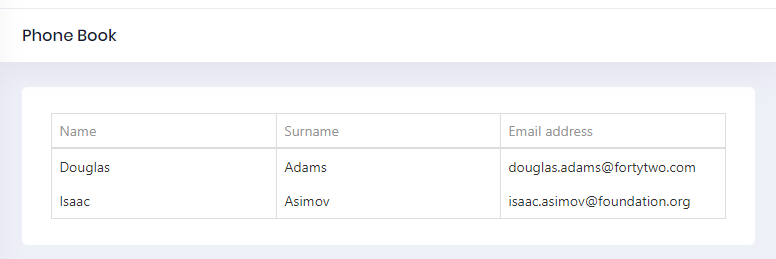
We successfully retrieved list of people from database to the page.
