
Localization
ASP.NET Zero User Interface is completely localized. ASP.NET Zero uses dynamic, database based, per-tenant localization.
XML files are used as base translations for desired languages (defined in the server-side); for defining and adding new localization, refer to the How to Add a New Language in an ASP.NET Zero Angular Application.
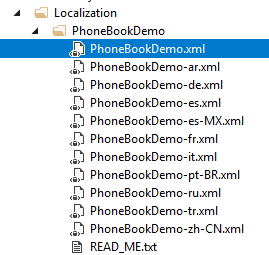
PhoneBook will be your ProjectName. You can add more XML files by copying one XML file and translate to desired language. See valid culture codes.
When you are adding a new localizable text, add it to the XML file of the default language then use in your application (Also, add translated values to corresponding XML files).
Application languages are defined in the DefaultLanguagesCreator class. This is used as seed data in the Entity Framework Migration. So, if you want to add a new default language, just add it into the DefaultLanguagesCreator class. This operation ensures that the new language is automatically seeded into the database during migration, making it available to the application at startup. This process occurs on the server side. You can refer to the documentation on How to Add a New Language in an ASP.NET Zero Angular Application for further guidance.
See localization and language management documentations for more information on localization.

