
DevExpress Reporting
In this document, we will integrate DevExpress Reporting to ASP.NET Zero (ASP.NET Core version) step by step.
Download DevExpress Reporting.
Open your ASP.NET Zero project.
Import
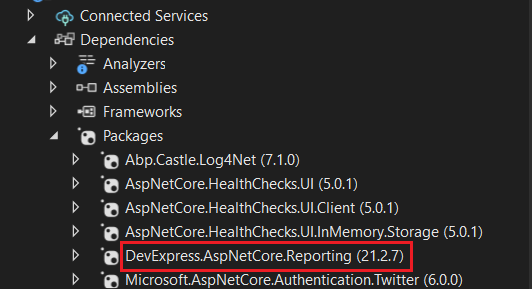
DevExpress.AspNetCore.Reportingpackage to[YOURAPPNAME].Web.Mvcproject.Then go to
Startup.csand add these code parts:
public IServiceProvider ConfigureServices(IServiceCollection services)
{
    //...
    services.AddDevExpressControls(); //add this line
}

public void Configure(IApplicationBuilder app, IWebHostEnvironment env, ILoggerFactory loggerFactory)
{
    //...
    app.UseDevExpressControls(); //add this line
}
- Now, you can create a sample report to test if it all works. Go to
[YOURAPPNAME].Web.Mvcand create a folder namedReports. - Right click on the
Reportsfolder then clickAdd->New Item, then selectDevExpress Reportitem. - Select
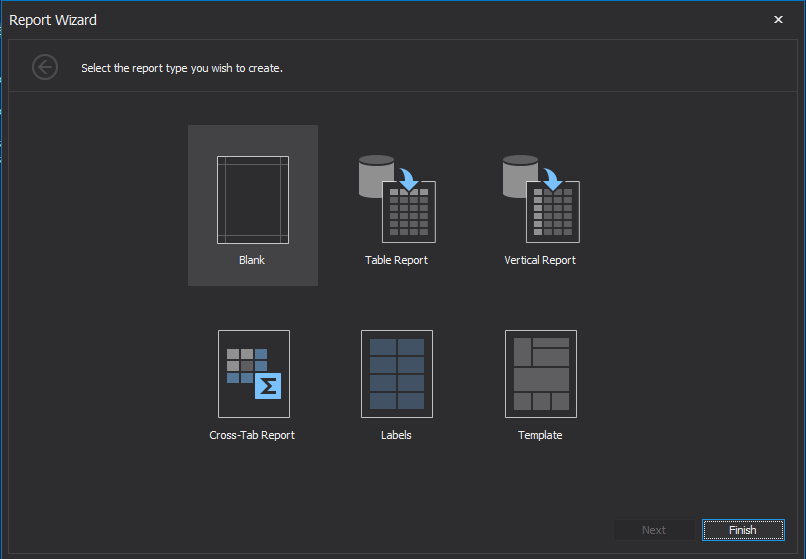
Blankreport in the opening wizard, and create new empty report named SampleReport.
(Design your report as you wish)
Go to
package.jsonand add following dependencies. (It is located in[YOURAPPNAME].Web.Mvcproject)dependencies: [ "devextreme": "21.2.*", "@devexpress/analytics-core": "21.2.*", "devexpress-reporting": "21.2.*", "jquery-ui-dist": "^1.12.1" ]Note: Version of the nuget and npm packages should match
Go to
bundles.jsonin mvc project and add following bundles.{ "scripts": [ { "output": "view-resources/Areas/App/Views/_Bundles/sample-report-min.js", "input": [ "node_modules/jquery-ui-dist/jquery-ui.js", "node_modules/knockout/build/output/knockout-latest.js", "node_modules/devextreme/dist/js/dx.all.js", "node_modules/@devexpress/analytics-core/dist/js/dx-analytics-core.js", "node_modules/devexpress-reporting/dist/js/dx-webdocumentviewer.js" ] } ], "styles": [ { "output": "/view-resources/Areas/App/Views/_Bundles/sample-report.min.css", "input": [ "node_modules/jquery-ui-dist/jquery-ui.css", "node_modules/devextreme/dist/css/dx.common.css", "node_modules/devextreme/dist/css/dx.light.css", "node_modules/@devexpress/analytics-core/dist/css/dx-analytics.common.css", "node_modules/@devexpress/analytics-core/dist/css/dx-analytics.light.css", "node_modules/devexpress-reporting/dist/css/dx-webdocumentviewer.css" ] } ] }Go to
_Layout.cshtmllocated in[YOURAPPNAME].Web.Mvc\Areas\App\Views\Layout\_Layout.cshtmland add new render section namedHeaderScriptsas nonrequired.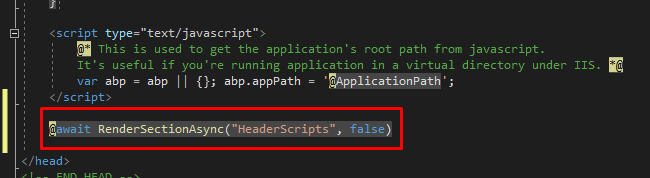
Create new controller named
CustomWebDocumentViwerControllerfor devexpress in MVC project's Areas/App folder.
    public class CustomWebDocumentViewerController : WebDocumentViewerController
    {
        public CustomWebDocumentViewerController(IWebDocumentViewerMvcControllerService controllerService) : base(controllerService) { }
    }
Create new controller named
SampleReportControllerin MVC project's Areas/App folder.[Area("App")] public class SampleReportController : Zerov1002CoreMvcDemoControllerBase { public IActionResult Index() { return View(); } }Create
Index.cshtmland add following code into it.@using DevExpress.AspNetCore @using Zerov1002CoreMvcDemo.Web.Reports; @section Styles { <link rel="stylesheet" abp-href="/view-resources/Areas/App/Views/_Bundles/sample-report.css" asp-append-version="true" /> } @section HeaderScripts { <script abp-src="/view-resources/Areas/App/Views/_Bundles/app-layout-libs.js" asp-append-version="true"></script> <script abp-src="/view-resources/Areas/App/Views/_Bundles/sample-report.js" asp-append-version="true"></script> } <div class="content d-flex flex-column flex-column-fluid"> <abp-page-subheader title="@L("SampleReport")"> </abp-page-subheader> <div class="@(await GetContainerClass())"> <div class="card card-custom gutter-b"> <div class="card-body"> @(Html.DevExpress().WebDocumentViewer("DocumentViewer") .Height("1000px") .Bind(new SampleReport()) ) </div> </div> </div> </div>
Your reporting file is ready to use.
Go to you
[YOURAPPNAME]WebMvcModule.Add following code into
PreInitializefunctionpublic override void PreInitialize() { //... IocManager.Register(typeof(CustomWebDocumentViewerController), DependencyLifeStyle.Transient); }
You can visit /App/SampleReport URL under your website to see your report.


