
API Keys
ASP.NET Zero includes a built-in API key authentication system that lets users create long-lived keys and use them to call the application's HTTP API without going through the interactive login flow. This is the recommended way to authenticate machine-to-machine integrations: scheduled jobs, CI/CD pipelines, server-to-server calls, scripts and third-party services that cannot maintain a browser session or refresh a JWT token.
An API key always belongs to a user. A request authenticated with an API key runs as that user, in that user's tenant, with that user's permissions, unless the key was explicitly restricted to a narrower set of permissions when it was created.
Every user can manage their own keys from the My API Keys page, while administrators can review and revoke every key in the tenant from the Administration > API Keys page.
Enabling API Key Authentication
API key authentication is controlled by a setting, so it can be turned on or off per host and per tenant without redeploying the application.
Navigate to Administration > Settings > User Management and find the API Keys section.
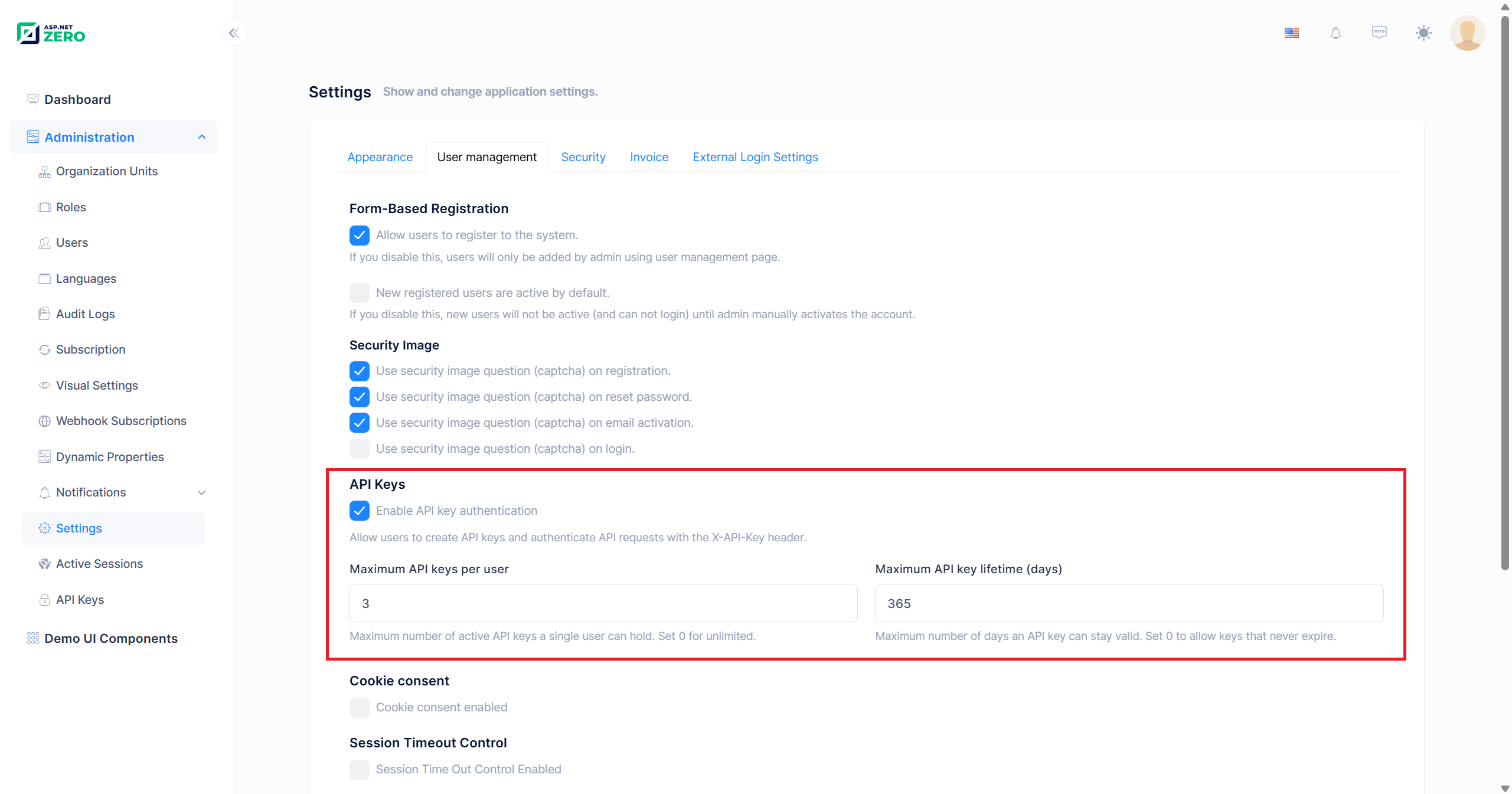
| Setting | Setting name | Default | Description |
|---|---|---|---|
| Enable API key authentication | App.UserManagement.ApiKey.IsEnabled |
true |
Master switch. When it is off, the API Keys menu item and the My API Keys link are hidden, the MVC pages return 404, the application service rejects every call with "API key authentication is currently disabled.", and incoming X-API-Key headers are ignored. |
| Maximum API keys per user | App.UserManagement.ApiKey.MaxKeyCountPerUser |
5 |
Maximum number of keys a single user can hold. Set 0 for unlimited. Expired keys still count until the cleanup worker removes them. |
| Maximum API key lifetime (days) | App.UserManagement.ApiKey.MaxExpirationInDays |
365 |
Maximum number of days a key can stay valid. When it is greater than 0, an expiration date becomes required and cannot be further in the future than this limit. Set 0 to allow keys that never expire. |
| Require an explicit permission scope | App.UserManagement.ApiKey.RequirePermissionScope |
false |
When it is on, a key has to be restricted to an explicit list of permissions. The Permissions switch in the create modal is locked on, and a key submitted without a permission is rejected with "Choose the permissions this API key may use. API keys without an explicit permission list are not allowed." Turn it on to stop users from minting keys that inherit everything they can do. See Permission Scope. |
All four settings are defined with SettingScopes.Application | SettingScopes.Tenant, so a tenant can tighten (or relax) them for its own users independently from the host. Their initial values can also be changed in appsettings.json before the first run:
{
  "App": {
    "App.UserManagement.ApiKey.IsEnabled": "true",
    "App.UserManagement.ApiKey.MaxKeyCountPerUser": "5",
    "App.UserManagement.ApiKey.MaxExpirationInDays": "365",
    "App.UserManagement.ApiKey.RequirePermissionScope": "false"
  }
}
Values in
appsettings.jsonare only the initial defaults. Once a value has been changed on the settings page, it is stored in the database and the configuration file no longer has any effect on it.
My API Keys
Users who hold the My API Keys permission can manage their own keys. The page is reachable from the user menu > My API Keys, at /App/MyApiKeys. The menu entry, the page and the application service behind it are all closed to users who do not hold the permission.
Pages.MyApiKeysis a top level permission under Pages, granted from Administration > Roles like any other page permission. An authenticated session does not imply it: calling the API with an existing key needs nothing, but creating, rotating and revoking one's own keys needs this permission. See Permissions.
The controllers live in the
AppAreaNamearea, which is renamed to your own area name (Appby default) when the project is generated.
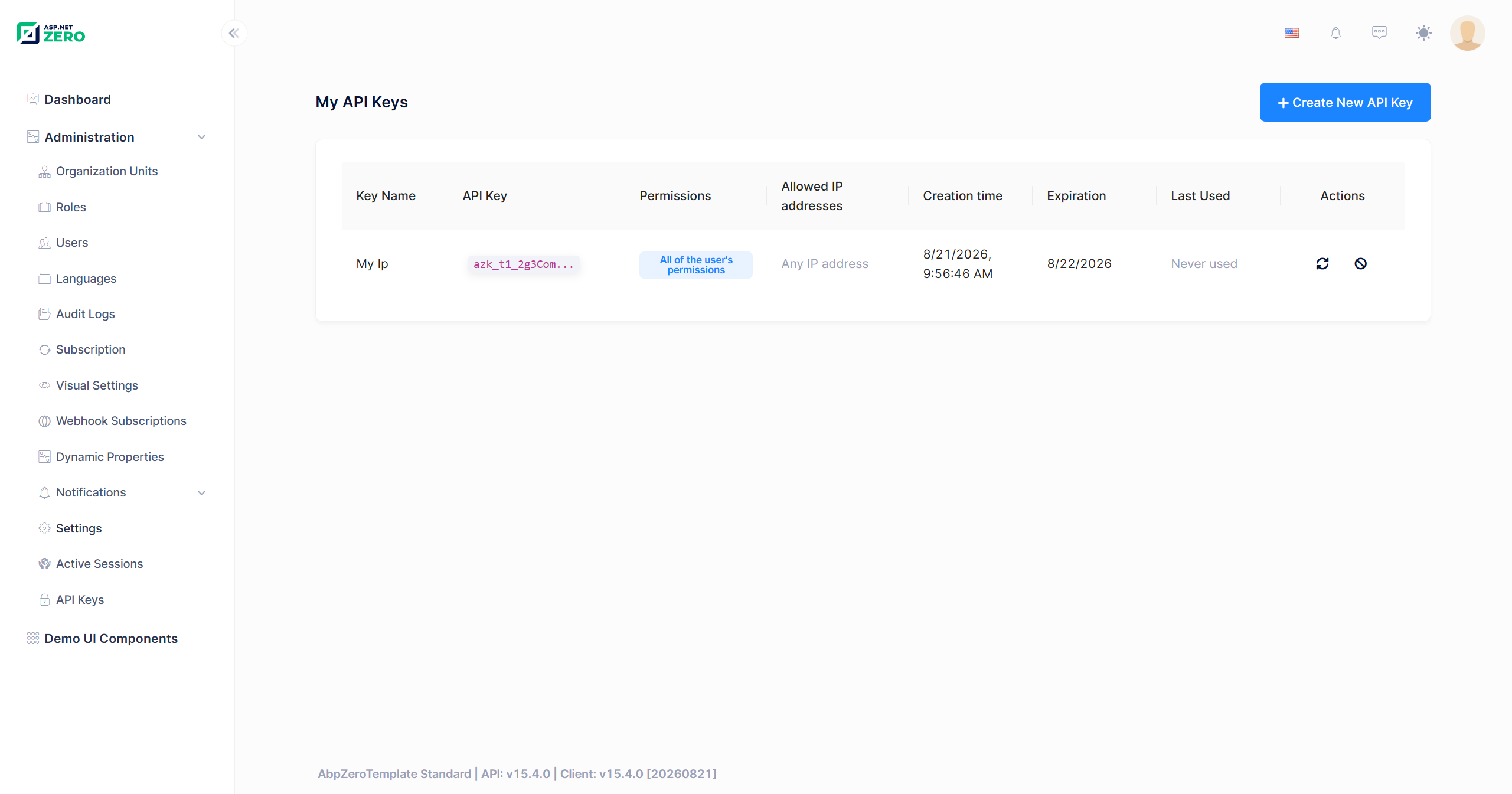
The list shows the following columns:
- Key Name – The descriptive name given when the key was created.
- API Key – The masked key (for example
azk_t3_9fK2Lp...). The full key is never stored and never shown again after creation. - Permissions – Either All of the user's permissions or Restricted to N permission(s). Clicking the restricted badge opens a modal that lists every granted permission with its full path.
- Allowed IP addresses – The IP allow list, or Any IP address when it is empty. Only the first two entries are displayed; the rest are shown in a tooltip on the
+Nbadge. - Creation Time – When the key was created.
- Expiration – The expiration date, Never expires, or an Expired badge.
- Last Used – When the key was last used to authenticate a request, or Never used.
- Actions – Rotate and Revoke.
The Create New API Key button is disabled once the user reaches the Maximum API keys per user limit.
Creating an API Key
Click Create New API Key to open the creation modal.
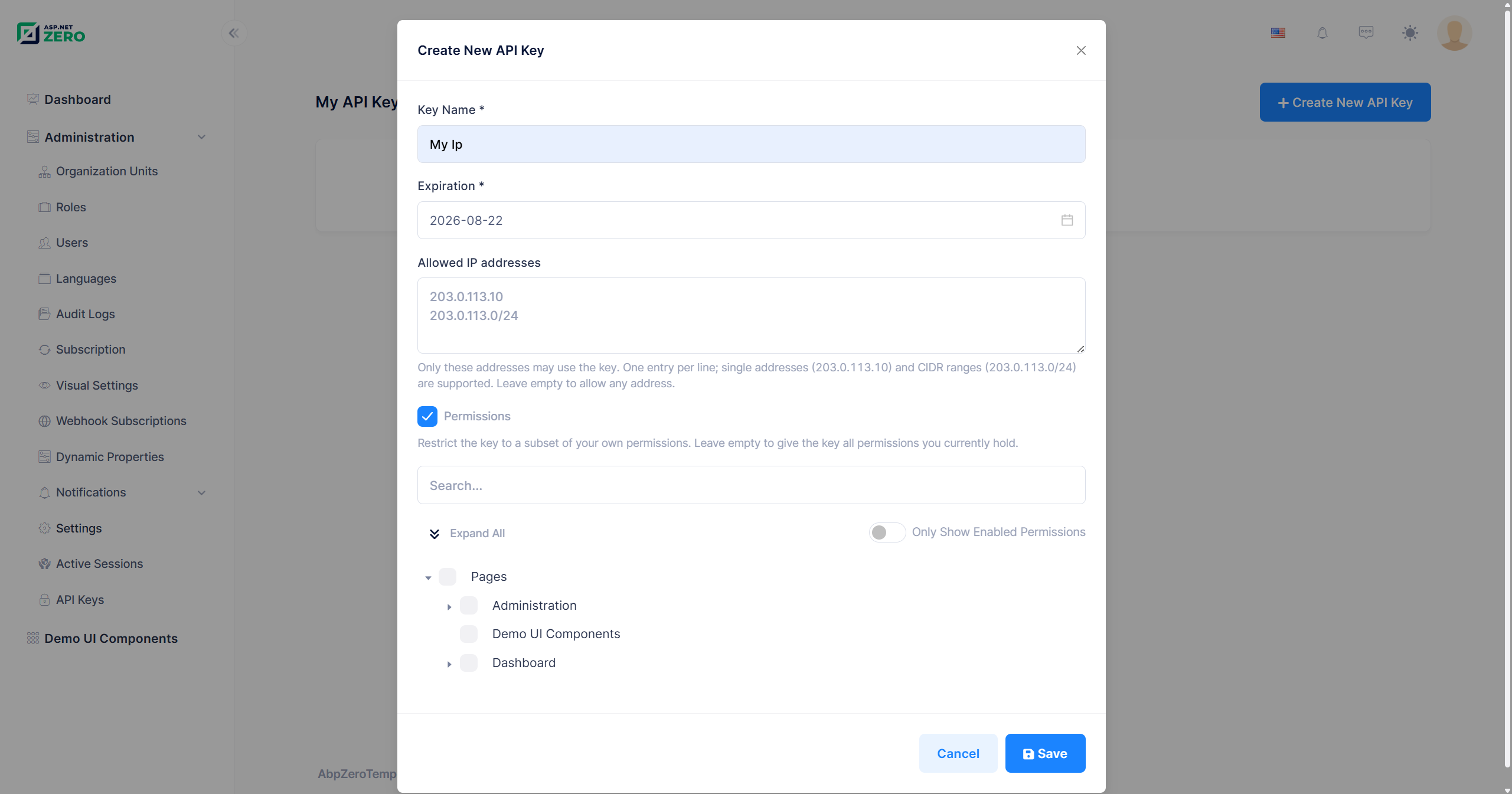
| Field | Required | Description |
|---|---|---|
| Key Name | Yes | A descriptive name, up to 128 characters. Use it to identify the integration the key belongs to (for example Nightly Import Job). |
| Expiration | Depends | Required when Maximum API key lifetime (days) is greater than 0, and then the date picker only offers dates between today and the configured limit. When the limit is 0, the field is optional and any future date is accepted; leaving it empty creates a key that never expires. The end of the selected day is submitted, so a key created for "today" stays valid until midnight. |
| Allowed IP addresses | No | An optional allow list. One entry per line (or comma separated). Leave it empty to allow requests from any address. See IP Allow List. |
| Permissions | Depends | A switch that reveals a permission tree. It is on by default, so a key is scoped unless the user deliberately widens it, and while it is on at least one permission has to be selected. Turning it off shows a warning that the key will be able to do everything its owner can do, including anything its owner is granted later. When Require an explicit permission scope is on, the switch is locked on and cannot be turned off. See Permission Scope. |
Once the key is created, it is displayed exactly once:
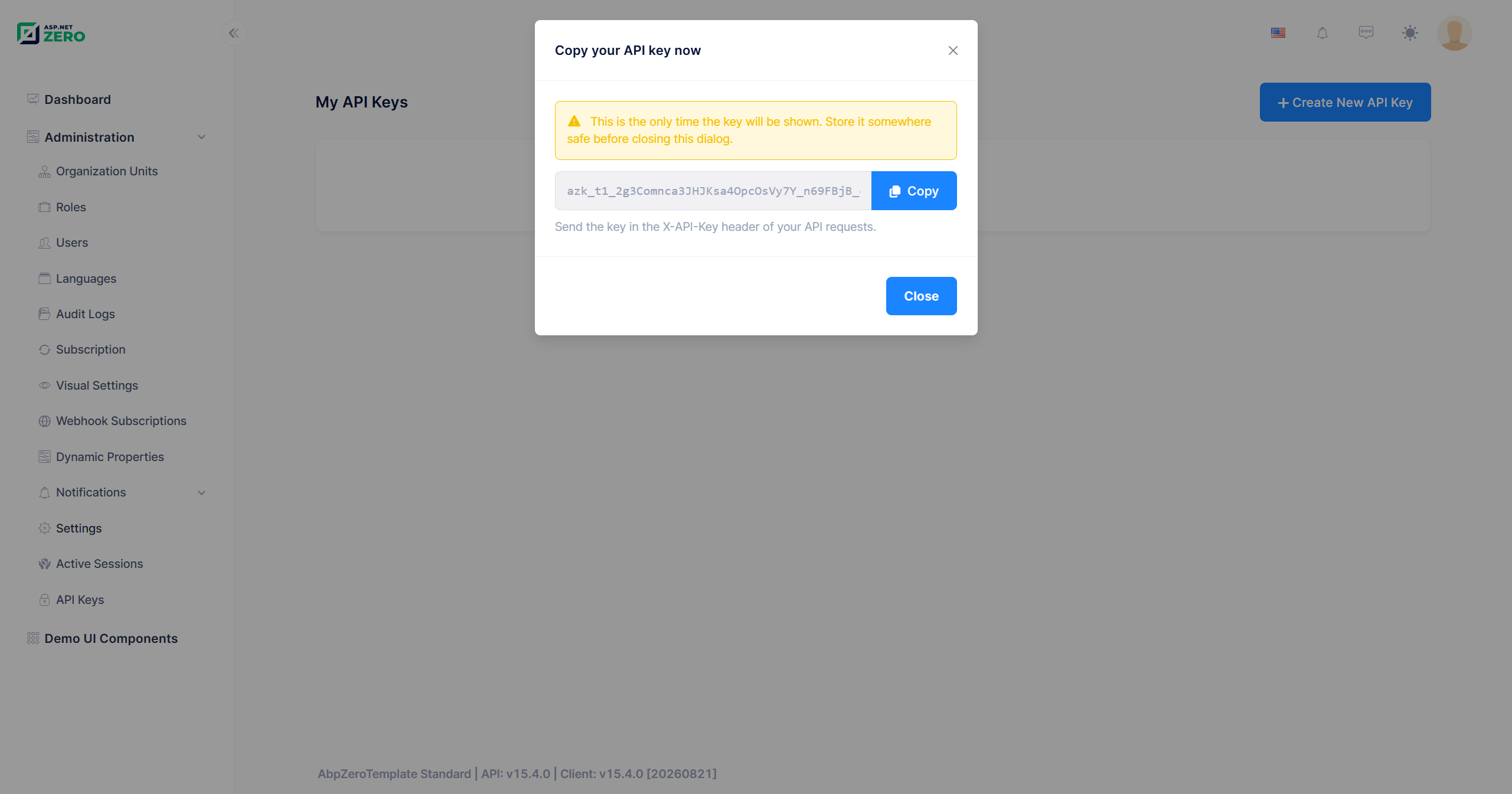
Only a SHA-256 hash of the key is stored in the database, so the plain key cannot be recovered afterwards. If it is lost, the key has to be rotated or revoked and re-created.
Rotating an API Key
Rotate replaces a key with a brand new one while keeping everything else about it identical: the name, the IP allow list and the permission scope are carried over, and the expiration date is preserved unless a new one is supplied. The old key stops working immediately and the new key is shown in the same one-time dialog used at creation.
Rotation is the recommended response to a leaked or soon-to-expire key, because the integration only needs the new secret value; nothing else about its configuration changes.
A few things are worth knowing:
- The UI rotates a key with its current expiration date, so a key that has already expired cannot be rotated from the page: the new expiration date has to be in the future. Revoke it and create a new one instead, or call
RotateApiKeydirectly with a newExpirationDate. - A key that never expires cannot be rotated from the page either, once Maximum API key lifetime (days) has been raised above
0. Such a key was created while the limit was0, so it carries no expiration date, and rotation now fails with a validation error saying that an expiration date is required. CallRotateApiKeywith anExpirationDatethat fits the new limit, or revoke the key and create a new one. - A key can only be rotated by the user it belongs to. Administrators can revoke another user's key, but they can never mint a new key in someone else's name.
Revoking an API Key
Revoke deletes the key and drops it from the cache. Any request using it fails from that moment on. Revoking one's own key requires either the My API Keys or the Revoking API keys permission; revoking someone else's key requires Revoking API keys.
UserApiKey is a FullAuditedEntity, so revocation is a soft delete: the row stays in the database with IsDeleted = 1 along with the deleting user and the deletion time, but it is filtered out of every query and no longer authenticates anything.
API Keys Administration Page
Users with the API Keys permission can see every API key in the tenant (or, on the host side, every host key) from Administration > API Keys, at /App/ApiKeys.
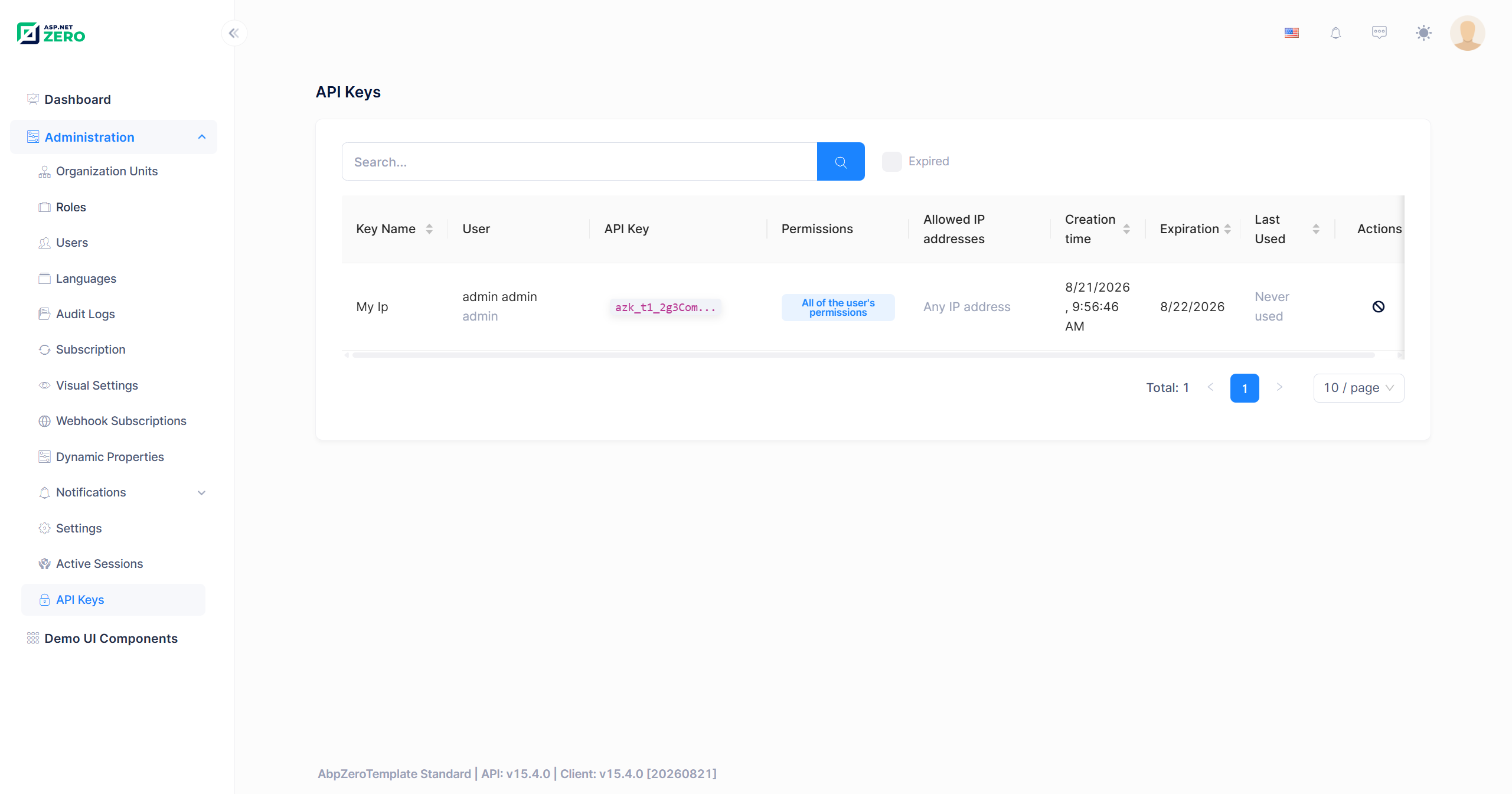
The page adds a User column (full name and username) to the columns of the My API Keys page and provides:
- A search box that filters on the key name, the username, the name and the surname of the owner.
- An Expired checkbox that lists only keys whose expiration date has already passed.
- Sortable Key Name, Creation Time, Expiration and Last Used columns, with server-side paging.
- A Revoke action, visible only to users who also hold the Revoking API keys permission.
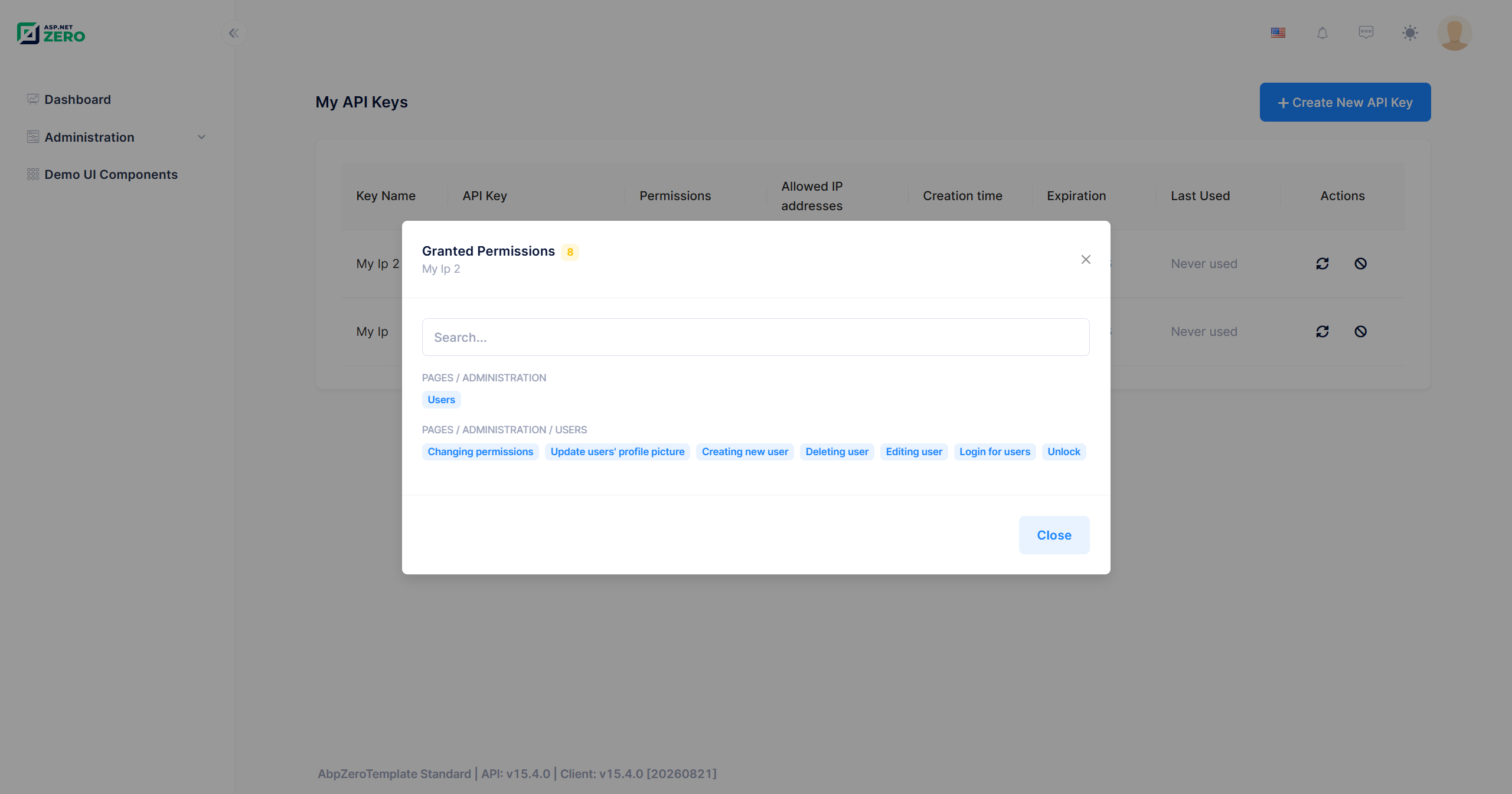
Clicking the Restricted to N permission(s) badge opens the granted permissions modal:
Using an API Key
Send the key in the X-API-Key HTTP header of your request:
curl -X POST "https://localhost:44301/api/services/app/User/GetUsers" \
     -H "X-API-Key: azk_t3_9fK2LpQ4rT8vX1zB6nM0sD3gH7jW5yC2eA4uI9oK1lP" \
     -H "Content-Type: application/json" \
     -d "{ \"maxResultCount\": 10, \"skipCount\": 0 }"
With HttpClient:
var client = new HttpClient
{
    BaseAddress = new Uri("https://localhost:44301/")
};

client.DefaultRequestHeaders.Add("X-API-Key", apiKey);

var response = await client.PostAsJsonAsync(
    "api/services/app/User/GetUsers",
    new { MaxResultCount = 10, SkipCount = 0 });
Notes:
- The tenant does not have to be specified. The tenant id is embedded in the key itself, so no
Abp.TenantIdheader is needed. - The header takes effect only when the request is not already authenticated. If a request carries both a valid bearer token and an
X-API-Keyheader, the bearer token wins. - An API key cannot be used to manage API keys. Creating, rotating and revoking keys are rejected with a user-friendly error when the request itself is authenticated with an API key. Listing keys is still allowed.
Key Format
A generated key looks like this:
azk_t3_9fK2LpQ4rT8vX1zB6nM0sD3gH7jW5yC2eA4uI9oK1lP
│   │  └── secret: 32 cryptographically random bytes, base64url encoded
│   └───── tenant segment
└───────── fixed prefix
| Segment | Value | Description |
|---|---|---|
| Prefix | azk |
Constant prefix (ApiKeyConsts.KeyPrefix) that makes ASP.NET Zero keys easy to recognize in logs and secret scanners. |
| Tenant segment | h or t{TenantId} |
h for a host user, t3 for a user of the tenant with id 3. It allows the tenant to be resolved before touching the database. |
| Secret | 43 characters | 32 bytes produced by RandomNumberGenerator, base64url encoded (+ → -, / → _, padding removed). |
The three segments are joined with _. A key can be at most 128 characters long.
What is Stored
| Column | Content |
|---|---|
KeyHash |
The lowercase hexadecimal SHA-256 hash of the full key (64 characters), with a unique index on it. This is what lookups run against. |
DisplayKey |
The visible part plus the first 6 characters of the secret and an ellipsis, for example azk_t3_9fK2Lp.... This is what the UI shows. |
The plain key value is never written to the database, to a log or to an audit record: the validation method is marked with [DisableAuditing], and so is the Key property of the CreateApiKeyOutput that hands the key back once. See Auditing.
Permission Scope
A key that carries no permission list inherits all permissions of its owner, dynamically. If the owner is later granted a new permission, the key can use it too; if a permission is taken away, the key loses it as well. That is a wide grant for an integration that usually needs one or two endpoints, so the create modal turns the Permissions switch on by default and warns before an unrestricted key is created. A host or a tenant that does not want such keys at all can forbid them with the Require an explicit permission scope setting.
A key can be restricted to a subset of permissions at creation time. In that case:
- The permission tree in the create modal only offers permissions the creating user actually holds. Attempting to grant a permission the user does not have is rejected with a validation error.
- A key can be scoped to at most 200 permissions.
- The scope is an upper bound only. It never grants anything: an operation is allowed only when it is both inside the key's scope and still granted to the owner.
- When Require an explicit permission scope is on, an empty scope is rejected. The check runs in
UserApiKeyManager.CreateAsync, so it also covers keys created by calling the application service directly rather than through the UI. Rotation is deliberately exempt: refusing to rotate a key that predates the setting would only keep its old secret alive, so a scope-less key stays scope-less across rotations. Revoke such keys and create scoped ones to retire them.
The scope is enforced in two places:
PermissionCheckernarrows every permission check made for the key's owner to the permissions in the scope.ApiKeyScopeAuthorizationHelper(registered by replacing ABP'sIAuthorizationHelper) blocks a scoped key from reaching any operation that is protected by a bare[AbpAuthorize]without a permission name. Without this, a narrowly scoped key would still be able to call every method that only requires "be logged in".
This means a scoped key can only call operations that explicitly require a permission. Operations that are merely
[AbpAuthorize]authenticated, but without a permission name are not available to scoped keys. Keys created without a scope are not affected by this rule, and endpoints that require no authorization at all are unaffected either way.
IP Allow List
An API key can be limited to a set of source addresses. When the allow list is empty, any address is accepted.
- Entries can be single IP addresses (
203.0.113.10,2001:db8::1) or CIDR ranges (203.0.113.0/24,2001:db8::/32). - IPv4 and IPv6 are both supported, and IPv4-mapped IPv6 addresses are normalized before matching, so
::ffff:203.0.113.10matches the203.0.113.10entry. - A key can hold at most 20 entries, stored as a comma separated string of at most 1024 characters.
- Invalid entries are rejected at creation time with a user-friendly message.
The client address is read from HttpContext.Connection.RemoteIpAddress. Behind a reverse proxy, a load balancer or a container ingress, this is the address of the proxy rather than that of the real client, so the allow list would compare the wrong address. The forwarded headers middleware runs before authentication in both Web.Host and Web.Mvc, so configure your proxies in appsettings.json to make the real client address visible:
{
  "App": {
    "ForwardedHeaders": {
      "KnownProxies": [ "10.0.0.5" ],
      "KnownNetworks": [ "10.0.0.0/8" ],
      "TrustAllProxies": false
    }
  }
}
Expiration and Cleanup
- When Maximum API key lifetime (days) is greater than
0, an expiration date is mandatory and may be at most that many days in the future. Setting the value to0allows keys that never expire. - An expiration date in the past is rejected.
- An expired key immediately stops authenticating requests. It stays in the list with an Expired badge so its owner can see what happened, and it keeps counting toward the Maximum API keys per user limit until it is cleaned up.
ExpiredApiKeyCleanupWorkeris a background worker that runs every 24 hours and deletes keys that expired more than 30 days ago (a soft delete, like revocation). It walks the host database and every tenant that has its own connection string, and logs (instead of throwing) if one of those databases is unreachable.- Last Used is not written on every request. It is only updated when the previous value is older than 5 minutes, which keeps a busy integration from producing a database write per call.
Caching
Validated keys are cached in the AppUserApiKeys cache, keyed by the key hash, for 5 minutes. The cache entry holds everything needed to authenticate a request: owner, tenant, expiration, IP allow list and permission scope. A repeated call therefore does not hit the database for the key itself.
Revoking or rotating a key removes its entry from the cache immediately.
In a clustered deployment, use a distributed cache so that a revocation on one instance is visible to all of them. With the default in-process cache, other instances keep serving a revoked key from their own copy until the entry expires (up to 5 minutes). See Deploying to a Clustered Environment.
Auditing
A request authenticated with an API key runs as the owner of the key, so on its own an audit record cannot be told apart from one the same user produced in the browser. ApiKeyAuditInfoProvider closes that gap. It replaces ABP's IAuditInfoProvider and, whenever the current request carries an API key, appends the authentication method, the key id and the key name to the CustomData of the audit record:
AuthenticationMethod: ApiKey, ApiKeyId: 42, ApiKeyName: Nightly Import Job
The value is shown in the Custom Data section of the audit log detail dialog under Administration > Audit Logs, and can be queried directly on the AbpAuditLogs.CustomData column.
CustomDatathat another provider already wrote is preserved; the API key information is appended after a|separator.- The key name comes from the
api_key_nameclaim thatApiKeyAuthenticationHandleradds next toapi_key_id. The id is always written; the name only when that claim is present. - The plain key is not available at this point and is never recorded.
The one-time key returned by CreateApiKey and RotateApiKey is protected separately: CreateApiKeyOutput.Key is marked with [DisableAuditing], so the secret stays out of the audit log even in an application that turns on return value auditing.
See Audit Logs for the audit log page itself.
Permissions
The feature is controlled by the following permissions:
| Permission | Name | Description |
|---|---|---|
| My API Keys | Pages.MyApiKeys |
Manage one's own keys on the My API Keys page: list, create, rotate and revoke them. A top level permission under Pages, next to Demo UI Components. |
| API Keys | Pages.Administration.ApiKeys |
Access to the Administration > API Keys page, which lists the keys of all users. |
| Revoking API keys | Pages.Administration.ApiKeys.Revoke |
Revoke any key listed on the Administration > API Keys page, including one's own. Shown as a child permission of API Keys. |
My API Keys is kept separate from the administration permissions on purpose: creating a key means handing out a long lived credential, so an organization may want to keep that in the hands of a few roles even though everyone can log in interactively. Keep in mind that a key can only ever be created and rotated by the user it belongs to, so the account an integration runs as has to hold this permission at least while its key is created or rotated.
Application Service
All operations go through IUserApiKeyAppService, which is exposed as a dynamic Web API under /api/services/app/UserApiKey/. The service is [AbpAuthorize] at class level, and every method first verifies that API key authentication is enabled.
| Method | Endpoint | Authorization |
|---|---|---|
GetMyApiKeys() |
GET /api/services/app/UserApiKey/GetMyApiKeys |
Pages.MyApiKeys. Also returns the grantable permissions, the configured limits, whether a permission scope is required and the header name, so the UI needs no second call. |
CreateApiKey(CreateApiKeyInput) |
POST /api/services/app/UserApiKey/CreateApiKey |
Pages.MyApiKeys; rejected when the request itself uses an API key. |
RotateApiKey(RotateApiKeyInput) |
POST /api/services/app/UserApiKey/RotateApiKey |
Pages.MyApiKeys, and the owner of the key only; rejected when the request itself uses an API key. |
RevokeApiKey(EntityDto<long>) |
POST /api/services/app/UserApiKey/RevokeApiKey |
Pages.MyApiKeys or Pages.Administration.ApiKeys.Revoke for one's own key, Pages.Administration.ApiKeys.Revoke for someone else's; rejected when the request itself uses an API key. |
GetApiKeys(GetApiKeysInput) |
POST /api/services/app/UserApiKey/GetApiKeys |
Pages.Administration.ApiKeys. Paged, sorted and filtered list of every key. |
Validation failures (limit reached, invalid IP entry, unknown or ungranted permission, expiration out of range, feature disabled) are thrown as UserFriendlyBadRequestException, which returns HTTP 400 with a localized message instead of the default 500.
How Authentication Works
The scheme is registered in AuthConfigurer of both Web.Host and Web.Mvc:
authenticationBuilder.AddApiKeyAuthentication();
and plugged into the pipeline right after the other authentication middlewares:
app.UseAuthentication();
app.UseJwtTokenMiddleware();
app.UseApiKeyAuthentication();
ApiKeyAuthenticationMiddleware only steps in when the request is not already authenticated and carries an X-API-Key header. It then runs the ApiKey scheme and, on success, assigns the resulting principal to HttpContext.User.
ApiKeyAuthenticationHandler and UserApiKeyManager validate the key in this order:
- Parse the key. The prefix and the tenant segment must be well formed and the key must not exceed 128 characters. A malformed key fails immediately, without a database query.
- Check the setting for the key's tenant. Because the setting is tenant scoped and the session tenant is not resolved yet, it is read for the tenant that owns the key. When API key authentication is disabled there, the header is ignored.
- Check the tenant. The tenant must exist and be active.
- Look up the key by its SHA-256 hash, first in the cache, then in the database.
- Check expiration and the IP allow list.
- Check the user. The owner must exist, be active and not be locked out.
- Update the last used time (at most once every 5 minutes). If the key row has disappeared in the meantime, authentication fails and the cache entry is dropped.
- Build the principal with
AbpUserClaimsPrincipalFactory, exactly as a normal login would, then add anapi_key_idclaim, anapi_key_nameclaim and oneapi_key_permissionclaim per permission in the scope. The name claim is what makes the key recognizable in the audit log.
Every failure returns the same generic "Invalid API key." result, so a caller cannot tell an unknown key apart from an expired one, a disabled user or a blocked IP address.
Accessing the Current API Key
Inject ICurrentApiKey anywhere in your application code to find out whether the current request was authenticated with an API key:
public class MyAppService : AbpZeroTemplateAppServiceBase
{
    private readonly ICurrentApiKey _currentApiKey;

    public MyAppService(ICurrentApiKey currentApiKey)
    {
        _currentApiKey = currentApiKey;
    }

    public async Task DoSomething()
    {
        if (_currentApiKey.IsAvailable)
        {
            //The request is authenticated with the API key _currentApiKey.Id,
            //created under the name _currentApiKey.Name
        }

        if (_currentApiKey.HasPermissionScope)
        {
            //The key was restricted to a subset of its owner's permissions
        }
    }
}
Use this, for example, to keep a sensitive operation out of reach of API keys, or to write the key id into your own records. The framework's own audit records are already marked; see Auditing.
Database Tables
AppUserApiKeys
| Column | Type | Description |
|---|---|---|
Id |
bigint |
Primary key. |
TenantId |
int? |
null for host users. |
UserId |
bigint |
Owner of the key. Cascade deleted with the user. |
Name |
nvarchar(128) |
Descriptive name. |
KeyHash |
nvarchar(64) |
SHA-256 hash of the key. Unique index. |
DisplayKey |
nvarchar(32) |
Masked key shown in the UI. |
ExpirationDate |
datetime2? |
null when the key never expires. |
LastUsedTime |
datetime2? |
Throttled to one update per 5 minutes. |
AllowedIpAddresses |
nvarchar(1024)? |
Comma separated IP addresses and CIDR ranges. |
The entity is a FullAuditedEntity<long> and implements IMayHaveTenant, so it carries the usual creation, modification and deletion audit columns and is filtered by tenant automatically. Indexes: KeyHash (unique), UserId, and TenantId, UserId.
AppUserApiKeyPermissions
| Column | Type | Description |
|---|---|---|
Id |
bigint |
Primary key. |
TenantId |
int? |
Tenant of the owning key. |
UserApiKeyId |
bigint |
Owning key. Cascade deleted with the key. |
Name |
nvarchar(128) |
Permission name, for example Pages.Administration.Users. |
UserApiKeyId, Name is a unique index. A key with no rows in this table is an unscoped key.
Both tables are created by the Added_UserApiKeys and Added_UserApiKey_IpAllowList_And_PermissionScope migrations.
Customization
Change the header name. The header is X-API-Key by default and can be overridden when the scheme is registered:
authenticationBuilder.AddApiKeyAuthentication(options =>
{
    options.HeaderName = "X-My-Api-Key";
});
Note that ApiKeyAuthenticationMiddleware looks for ApiKeyConsts.HeaderName when deciding whether to run the scheme, so change the constant as well if you want the middleware to pick up the new header.
Resolve the client address differently. Override GetClientIpAddress() in a class derived from ApiKeyAuthenticationHandler if your infrastructure exposes the caller's address in a custom header instead of via forwarded headers.
Change the cleanup behaviour. CleanupPeriodHours (24) and RetentionDays (30) in ExpiredApiKeyCleanupWorker control how often expired keys are purged and how long they are kept.
Change the cache duration. ApiKeyConsts.CacheDurationInMinutes (5) controls how long a validated key stays cached, and ApiKeyConsts.LastUsedTimeUpdateThresholdMinutes (5) how often Last Used is written.
Change the limits. ApiKeyConsts.MaxAllowedIpAddressCount (20) and ApiKeyConsts.MaxPermissionCount (200) cap the size of the IP allow list and the permission scope.
Security Considerations
- Treat a key like a password. Anyone holding it can act as its owner. Store it in a secret manager, never in source control.
- Prefer scoped keys. Grant an integration only the permissions it actually needs, instead of handing it everything its owner can do. The create modal scopes a key by default; turn on Require an explicit permission scope to make it mandatory.
- Restrict who can create keys. My API Keys is a permission of its own, so key creation can be limited to the roles that really need it.
- Prefer short lifetimes and rotate regularly. Keep Maximum API key lifetime (days) at a value that forces periodic rotation.
- Use the IP allow list whenever the integration calls from a known, stable address.
- Always use HTTPS. The key travels in a plain header.
- Combine it with rate limiting. Rate limit policies can partition requests By API Key, so a single key cannot exhaust your API. See Rate Limiting.
- Watch the Last Used column. A key that has never been used, or has not been used in a long time, is a good candidate for revocation.
- Review the audit log. Every request made with a key is tagged with the key's id and name, so key traffic can be told apart from interactive use. See Auditing.

