
Workflow Administration
This document describes how workflows are configured by the host and by each tenant, the permissions involved, and the pages used to monitor requests.
Host settings
Host administrators configure workflows in Administration > Settings > Workflows. These values are the defaults for every tenant.
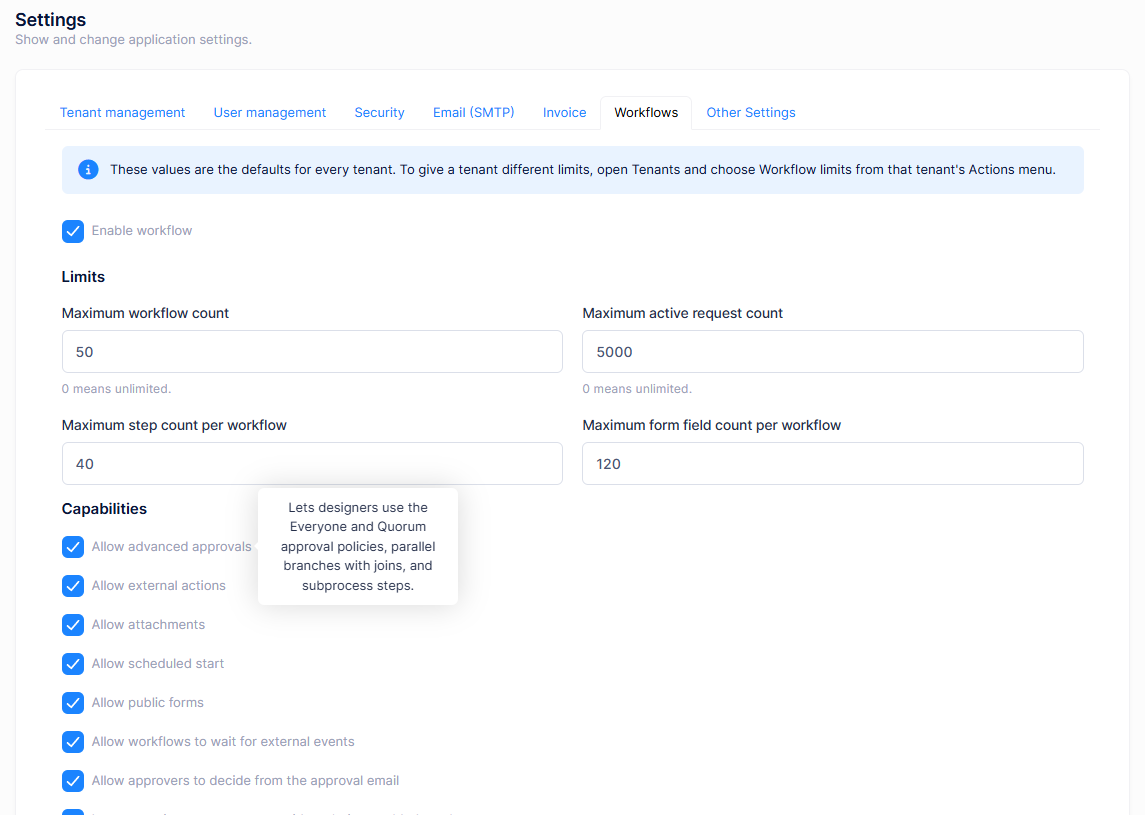
Enabling workflows
Enable workflow turns the feature on or off. It is on by default. When it is off, the workflow menus are hidden in every tenant.
Limits
| Setting | Description |
|---|---|
| Maximum workflow count | How many workflow definitions a tenant can have. 0 means unlimited. |
| Maximum active request count | How many requests can be in progress at the same time. 0 means unlimited. |
| Maximum step count per workflow | The step limit shown in the designer as Steps N / max. |
| Maximum form field count per workflow | The field limit of the form builder. |
To give a tenant different limits, open Tenants and choose Workflow limits from that tenant's Actions menu.
Capabilities
Capabilities turn optional parts of the feature on or off. Hover over a capability's label on the settings page to see a short description.
| Capability | Default | What it enables |
|---|---|---|
| Allow advanced approvals | On | The Everyone must approve and A quorum must approve decision policies, Parallel and Join steps, and Subprocess steps. |
| Allow external actions | Off | The Action step, which calls registered actions, webhooks and HTTP connection profiles. |
| Allow attachments | On | Attachment form fields and file uploads on requests, including public forms. |
| Allow scheduled start | Off | The Scheduled trigger. Turning it off stops existing schedules. |
| Allow public forms | Off | The Public form trigger. Turning it off stops existing public form links. |
| Allow workflows to wait for external events | Off | The Wait for event step and the Workflow events page. |
| Allow approvers to decide from the approval email | Off | Approve and reject links in approval emails. Tenants can also change this in their own Workflow Settings. |
| Let new action connectors run without being enabled one by one | On | Makes every registered action connector available to tenants unless a tenant turns it off in Action catalog. |
| Collect process analytics | On | Background metric collection and the Process analytics page. |
| Show per-reviewer analytics | Off | Analytics per approver. Requires process analytics and the Reviewer analytics permission. |
| Allow running requests to be migrated to a newer version | Off | Version migration of running requests. |
| Allow workflows to be exported as BPMN 2.0 | On | Export as BPMN. |
| Allow workflows to be imported from BPMN 2.0 | Off | Import from BPMN. |
| Elsa workflow JSON import and export | Off | Export as Elsa JSON and Elsa import. |
| Allow AI to draft workflows | Off | Describe and create and AI suggestions in the designer. An AI service must be configured; choose it in the settings that appear when this is on. |
Host pages
The host's Workflows menu has two pages:
- Workflow Health shows workflow throughput across every tenant without opening any tenant's business data. It also warns about deployment problems, such as a missing encryption key for workflow secrets.
- Workflow AI usage shows AI calls and tokens across every tenant. Pick a tenant to see its AI agents one by one.
Workflow Settings
Each tenant configures its own workflow behaviour in Workflows > Workflow Administration > Workflow Settings.
| Tab | Settings |
|---|---|
| Business calendar | Timezone, Business days, Business day start hour, Business day end hour and Holidays. Used by due dates, reminders, escalations and timers that use the business calendar. |
| Approvals | Default self approval policy: Do not allow self approval (default), Allow self approval or Skip the step for the requester. Allow workflow actions during impersonation. |
| Retention | History retention period (days) and Send a daily reminder digest. |
| Attachments | Allowed attachment file extensions, Maximum attachment size (bytes) and Keep the values of hidden form fields. |
| Channels | Where notifications are delivered outside the application: deciding from the approval email (with Approval link lifetime (hours) and Require a reason when deciding from email), Microsoft Teams, Slack, deciding from a chat card, and the connection profiles they use. Requires Managing decision channels. |
| Edition limits | The tenant's usage of its workflow and active request limits. |
Users with Linking chat accounts also see Connected chat accounts, where they can link the chat accounts of people who cannot link their own.
Permissions
Workflow permissions are tenant permissions, granted in Administration > Roles or per user. The tenant's Admin role has all of them by default. Other roles, including the default User role, have none.
| Permission | Allows |
|---|---|
| Workflows | The parent of every workflow permission. |
| Workflow Requests | My Requests. |
| Workflow Requests > Starting workflow requests | Starting requests from the Request Catalog. |
| Workflow Requests > Withdrawing workflow requests | Withdrawing your own requests. |
| Approval Inbox | Seeing your tasks in Approval Inbox. |
| Approval Inbox > Acting on workflow tasks | Approving, rejecting and requesting changes. |
| Workflow Delegations | Workflow Delegations. |
| Workflow Definitions | Listing workflow definitions. |
| Workflow Definitions > Creating / Editing / Publishing / Retiring workflow definitions | Managing definitions in the designer. |
| Workflow Definitions > Managing public forms, Managing scheduled starts | Public form and scheduled triggers. |
| Workflow Definitions > Exporting workflows to BPMN, Importing workflows from BPMN | BPMN exchange. |
| Workflow Templates | Workflow Templates. |
| Workflow Instances, > Operating workflow instances, > Migrating running requests | Workflow Instances, Workflow Operations and version migration. |
| Workflow Audit, > Exporting workflow audit | Workflow Audit. |
| Process analytics, > Reviewer analytics, Exporting process analytics, Rebuilding process analytics | Process analytics. |
| Workflow Settings, > Managing decision channels, > Linking chat accounts, > Connection profiles | Workflow Settings and its channel settings. |
| Workflow secrets, Action catalog, Events, AI agents, AI proposals, AI usage | The pages of the optional features. |
A typical setup:
| Role | Permissions |
|---|---|
| Employees | Starting workflow requests, Withdrawing workflow requests |
| Approvers | Acting on workflow tasks, Workflow Delegations |
| Process owners | Workflow Definitions and its children, Workflow Templates, Workflow Instances, Process analytics |
Monitoring
The monitoring pages are under Workflows > Workflow Administration.
| Page | Description |
|---|---|
| Workflow Instances | Every request that has been started, with its current step and status. Open one to see its path through the flow, its tasks and its history. |
| Workflow Operations | The Operations Dashboard. Intervene in stuck requests, retry failed steps and watch the health of background processing. Requires Operating workflow instances. |
| Workflow Audit | The Workflow Audit Trail. Search every workflow action for compliance and reporting, and export it. |
| Process analytics | How long processes take, where they stall and which steps need attention, including a heat map on the flow. Metrics are collected in the background, so new data can take a while to appear. |
Optional features
These pages appear when the related capability is enabled by the host and the user has the permission:
| Page | Description |
|---|---|
| Workflow events | Defines the external events that the Wait for event step waits for. |
| Action catalog | Lists the action connectors and turns them on or off for the tenant. |
| Connection profiles | Endpoints used by HTTP actions and chat channels. |
| Workflow secrets | Encrypted values, such as API keys, referenced by connection profiles and AI agents. Values are never shown again after saving. |
| AI agents, AI proposals, AI usage | Configure the AI agents used by AI agent steps, review AI suggestions, and see the calls made and tokens spent by AI agents and the designer assistant. |
