
Power Tools Bulk Operations
Power Tools can generate bulk operations for an entity, so users can act on many records at once from the generated list page. Bulk operations are available in the Angular, React and MVC UIs, for the DataTable, Card View and Master Detail page templates.
Enabling Bulk Operations
Open your entity in the Power Tools web UI and go to the Entity Information step. The Bulk Operations section lists an option for each operation. All of them are off by default, so you only generate what the entity needs.
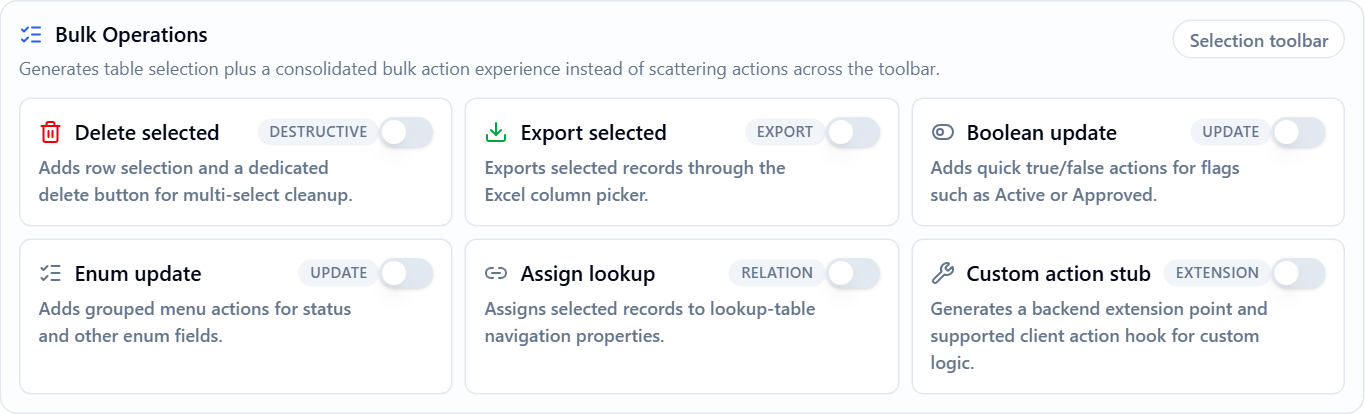
| Option | What it adds | Requires | Permission |
|---|---|---|---|
| Delete selected | A Delete selected button. | Delete |
|
| Export selected | Exports the selected records through the Excel column picker. | Create Excel Export Button | Page permission |
| Boolean update | Actions that set a boolean property to true or false. | A bool property |
Edit |
| Enum update | Actions that set an enum property to one of its values. | An enum property | Edit |
| Assign lookup | An action that assigns the selected records to a value of a navigation property. | A navigation property with the LookupTable view type |
Edit |
| Custom action stub | An empty server method and a client action for your own logic. | Edit |
An option is ignored when the entity does not meet its requirement. For example, Boolean update generates nothing for an entity without a bool property.
After changing the options, generate the entity again.
Using Bulk Operations
The generated list page adds row selection, and the actions appear once records are selected:
- Delete selected appears when more than one record is selected.
- The other actions are grouped under a Bulk actions menu.
The page acts on the selected records by default. If the current filter matches more records than are selected, a message shows Apply to {0} selected records with an Apply to all {0} filtered records link. This link extends the action to every record that matches the current filter, including the records on other pages.
Generated Server Code
Each operation adds a method to the generated application service:
| Option | Method | Input class |
|---|---|---|
| Delete selected | DeleteBulk |
BulkDelete{Entities}Input |
| Export selected | GetSelected{Entities}ToExcel |
BulkExport{Entities}Input |
| Boolean update | BulkUpdateBoolean |
BulkUpdate{Entities}BooleanInput |
| Enum update | BulkUpdateEnum |
BulkUpdate{Entities}EnumInput |
| Assign lookup | BulkAssignLookup |
BulkAssign{Entities}LookupInput |
| Custom action stub | CustomBulkAction |
BulkCustomAction{Entities}Input |
All input classes have these properties:
| Property | Description |
|---|---|
Ids |
The ids of the selected records. Required when SelectAllFiltered is false. |
SelectAllFiltered |
Set true to act on every record that matches Filter. |
Filter |
The same filter input as the list page. Required when SelectAllFiltered is true. |
The update and assign inputs also have PropertyName and Value. PropertyName is checked against a list of the entity's generated properties, and any other name is rejected. The export input also has SelectedColumns.
For example, this is the method generated for a Product entity:
[AbpAuthorize(AppPermissions.Pages_Products_Delete)]
[HttpPost]
public virtual async Task DeleteBulk(BulkDeleteProductsInput input)
{
    var query = _productRepository.GetAll();

    if (input.SelectAllFiltered)
    {
        query = ApplyFilters(query, input.Filter);
    }
    else
    {
        var ids = input.Ids.Distinct().ToList();
        query = query.Where(e => ids.Contains(e.Id));
    }

    await query.ExecuteDeleteAsync();
}
The queries start from the repository, so tenant and soft delete filters still apply.
How Records Are Changed
Bulk operations are designed to work on many records efficiently. Some of them therefore run directly in the database instead of loading each entity:
| Operation | How it runs | Result |
|---|---|---|
| Boolean update, Enum update, Assign lookup | ExecuteUpdateAsync |
Entities are not loaded. |
Delete selected, FullAuditedEntity base class |
Loads the records and calls DeleteAsync for each one |
Records are soft deleted. This takes longer for a large number of records. |
| Delete selected, other base classes | ExecuteDeleteAsync |
Records are permanently deleted. Entities are not loaded. |
When entities are not loaded, Entity Framework Core does not track the change. Entity events are not triggered, audit fields such as
LastModificationTimeare not updated, and the change does not appear in entity history. If your entity relies on these, override the method and change the entities one by one.
Adding Your Own Bulk Action
Custom action stub generates a CustomBulkAction method that resolves the selected or filtered records and leaves the rest to you:
[AbpAuthorize(AppPermissions.Pages_Products_Edit)]
[HttpPost]
public virtual async Task CustomBulkAction(BulkCustomActionProductsInput input)
{
    var query = _productRepository.GetAll();

    if (input.SelectAllFiltered)
    {
        query = ApplyFilters(query, input.Filter);
    }
    else
    {
        var ids = input.Ids.Distinct().ToList();
        query = query.Where(e => ids.Contains(e.Id));
    }

    // TODO: Implement custom bulk action logic.
    await Task.CompletedTask;
}
The generated application service is overwritten when you regenerate the entity. To keep your logic, turn on Generate Overridable Entity and override the method in ProductsAppService.Extended.cs, which Power Tools never overwrites. All bulk methods are virtual, so you can override the other operations in the same way. See Custom Code - Angular, Custom Code - React or Custom Code - MVC.
Entity JSON Fields
If you edit the entity JSON file manually, each option has its own field:
{
  "CreateBulkDelete": true,
  "CreateBulkExcelExport": true,
  "CreateBulkUpdateBoolean": true,
  "CreateBulkUpdateEnum": true,
  "CreateBulkAssignLookup": true,
  "CreateBulkCustomAction": true
}
Localization and Tests
Power Tools adds the texts of the generated actions, such as Delete selected and Bulk actions, to your localization file. If you turn on Unit Test, the generated application service tests also cover bulk delete.
