
Power Tools Custom Code - React
ASP.NET Zero Power Tools generates code that can be fully regenerated whenever you change an entity. The Custom Code feature lets you add your own code to the generated pages and classes so that your additions survive regeneration.
This page covers how Custom Code works in React projects. For other UI frameworks, see Custom Code - Angular and Custom Code - MVC. For the MAUI mobile app, see Custom Code - MAUI.
Enabling Custom Code
Open Power Tools, select your entity, and turn on the Generate Overridable Entity switch in the Entity Information section.
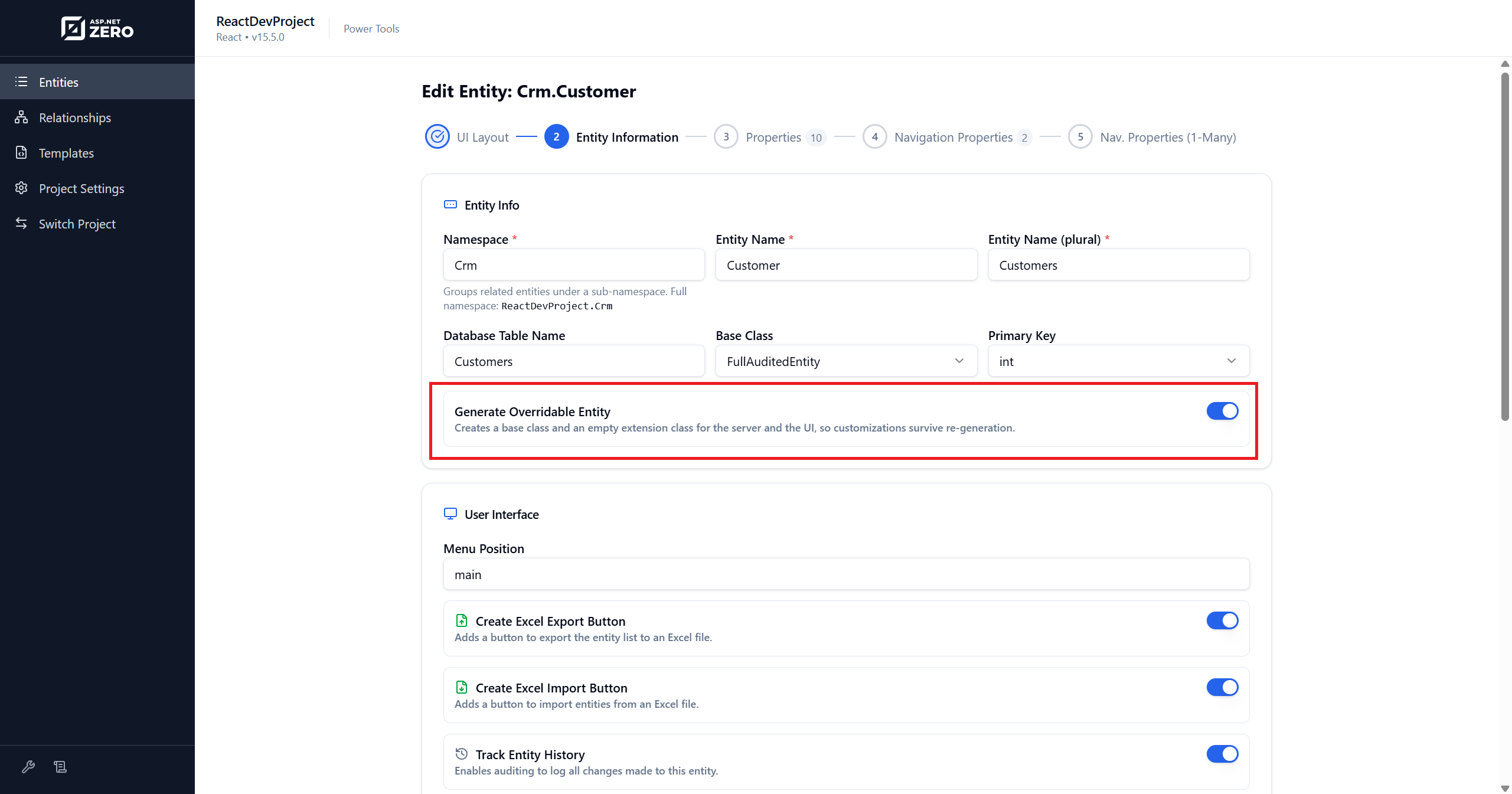
When this switch is on, Power Tools generates additional customization files that you own. These files are created once and never overwritten, even when you regenerate the entity.
The switch affects both the server side and the client side.
Requirements
Project version. Every React customization file requires a v15.5+ project. React code generation
itself is supported from v15.0, so on a v15.0-v15.4 project the switch generates the server-side extension
files and nothing on the client. If you turn the switch on and no customizations.tsx appears, check the
project version first.
Limitations
Master-detail child entities. The switch has no effect on a child entity in a master-detail pair - neither the server-side extension files nor any of the React customization files are generated for it.
How It Works
React uses a different approach than Angular and MVC. Instead of inline region markers or base/subclass patterns for UI files, React generates separate customization files with typed hook functions that the generated page imports and calls at fixed extension points.
| Mechanism | How It Works | Applies To |
|---|---|---|
| Extension files (SkipIfExists) | A base class is regenerated every time. A developer-owned subclass is generated once and never overwritten. | Server-side C# files only |
| Customization files | Separate .tsx files with hook functions. Never overwritten. The generated page imports and calls them. |
React pages, forms, and detail views |
| Regenerated type definitions | A customizations.types.ts file that is regenerated to keep TypeScript types in sync with the entity. |
React customization contexts |
Server Side
When Generate Overridable Entity is enabled, the following server-side extension files are generated. These are shared across all UI frameworks.
Power Tools splits each generated class in two: the generated half keeps the original file name and gains a
Base suffix on the class name, and your half is a new .Extended.cs file holding a subclass at the
original class name. Existing references keep resolving to your class, so nothing else in the solution has to
change.
For a Product entity, the generated files are:
| Your file (never overwritten) | Regenerated file | Purpose |
|---|---|---|
ProductsAppService.Extended.cs |
ProductsAppService.cs |
Override application service methods |
IProductsAppService.Extended.cs |
IProductsAppService.cs |
Extend the service interface |
Product.cs |
ProductBase.cs |
Add custom properties or methods to the entity |
CreateOrEditProductDto.Extended.cs |
CreateOrEditProductDto.cs |
Extend the input DTO |
ProductDto.Extended.cs |
ProductDto.cs |
Extend the list DTO |
GetAllProductsInput.Extended.cs |
GetAllProductsInput.cs |
Add custom filter parameters |
GetAllProductsForExcelInput.Extended.cs |
GetAllProductsForExcelInput.cs |
Add custom Excel export filter parameters |
GetProductForViewDto.Extended.cs |
GetProductForViewDto.cs |
Extend the view/list output DTO |
GetProductForEditOutput.Extended.cs |
GetProductForEditOutput.cs |
Extend the edit output DTO |
ProductXLookupTableDto.Extended.cs |
ProductXLookupTableDto.cs |
Extend the lookup DTO for navigation property X |
ProductsController.Extended.cs |
ProductsController.cs |
Extend the Web.Host API controller |
The entity is the one exception to the naming pattern. Because EF Core maps the class by name, the file is renamed rather than the class:
ProductBase.csis regenerated, andProduct.csis yours and is never overwritten. Do not expect aProduct.Extended.cs, and do not treatProduct.csas generated.
Each .Extended.cs file contains:
// Write your custom code here.
// ASP.NET Zero Power Tools will not overwrite this class
// when you regenerate the related entity.
The base files (without .Extended) are fully regenerated on every run. New entity properties automatically flow into them. Your customizations in the extension files are preserved because Power Tools never touches them after the first generation.
React Customization Files
When you enable Generate Overridable Entity, Power Tools generates the following files alongside the main page:
| Generated File | Overwritten? | Purpose |
|---|---|---|
customizations.tsx |
Never | Hook functions for the list page: extra columns, row actions, toolbar actions |
customizations.types.ts |
Yes (regenerated) | TypeScript types for the customization context |
CreateOrEdit*Modal.custom.tsx |
Never | Hook functions for the form: extra fields, before/after save |
View*Modal.custom.tsx |
Never | Hook functions for the detail view: extra detail items |
customizations.types.tsis the only customization-related file that gets regenerated. This is intentional, when the entity shape changes, the type definitions update and any stale code in your customization files produces a compile error rather than breaking silently.
File Layout Example for a Product Entity
pages/admin/inventory/products/
├── index.tsx                                    ← regenerated (main page)
├── customizations.tsx                           ← yours (list page hooks)
├── customizations.types.ts                      ← regenerated (types)
├── components/
│   ├── CreateOrEditProductModal.tsx              ← regenerated
│   ├── CreateOrEditProductModal.custom.tsx       ← yours (form hooks)
│   ├── ViewProductModal.tsx                      ← regenerated
│   └── ViewProductModal.custom.tsx              ← yours (detail hooks)
List Page Hooks
The customizations.tsx file provides three hook functions for the list page:
import type { ReactNode } from "react";
import type {
  ProductColumn,
  ProductRowAction,
  ProductsPageContext,
} from "./customizations.types";

/** Columns appended after the generated ones. */
export const extraColumns = (ctx: ProductsPageContext): ProductColumn[] => [];

/** Extra entries for a row's action menu, appended after the generated ones. */
export const extraRowActions = (
  ctx: ProductsPageContext,
  record: Parameters<NonNullable<ProductColumn["render"]>>[1],
): ProductRowAction[] => [];

/** Extra buttons in the page header, rendered after the generated ones. */
export const extraToolbarActions = (ctx: ProductsPageContext): ReactNode => null;
The generated index.tsx imports these functions and calls them at the right points:
extraColumnsis spread into the Ant Design table column definitionsextraRowActionsis pushed into each row's action dropdown menuextraToolbarActionsis rendered in the page header area
Example - Adding a Custom Column
export const extraColumns = (ctx: ProductsPageContext): ProductColumn[] => [
  {
    title: "Custom Score",
    dataIndex: ["product", "customScore"],
    render: (text: any) => <span>{text ?? "-"}</span>,
  },
];
Example - Adding a Custom Toolbar Button
export const extraToolbarActions = (ctx: ProductsPageContext): ReactNode => (
  <button
    className="btn btn-outline-primary btn-sm"
    onClick={() => ctx.navigate("/app/admin/reports/products")}
  >
    Product Report
  </button>
);
Example - Adding a Custom Row Action
export const extraRowActions = (
  ctx: ProductsPageContext,
  record: Parameters<NonNullable<ProductColumn["render"]>>[1],
): ProductRowAction[] => [
  {
    key: "duplicate",
    label: "Duplicate",
    onClick: () => {
      // your duplication logic here
    },
  },
];
Form Hooks
The CreateOrEdit*Modal.custom.tsx file provides three hook functions for the create/edit form:
import type { ReactNode } from "react";
import type { CreateOrEditProductFormContext } from "../customizations.types";
import type { CreateOrEditProductDto } from "@api/generated/service-proxies";

/** Form items rendered after the generated ones. */
export const extraFormFields = (
  ctx: CreateOrEditProductFormContext,
): ReactNode => null;

/**
 * Runs after validation, just before the record is sent to the server.
 * Adjust `dto` in place to add computed values.
 * Throw to cancel the save.
 */
export const beforeSave = async (
  ctx: CreateOrEditProductFormContext,
  dto: CreateOrEditProductDto,
): Promise<void> => {};

/** Runs after the record is saved and before the modal closes. */
export const afterSave = async (
  ctx: CreateOrEditProductFormContext,
  dto: CreateOrEditProductDto,
): Promise<void> => {};
The generated CreateOrEditProductModal.tsx calls these hooks:
extraFormFieldsis rendered after the generated form fields inside the<Form>beforeSaveis called after form validation, before the API call -- throw to cancel the saveafterSaveis called after a successful save, before the modal closes
Example - Adding a Custom Form Field
export const extraFormFields = (
  ctx: CreateOrEditProductFormContext,
): ReactNode => (
  <Form.Item
    label="Internal Notes"
    name="internalNotes"
    rules={[{ max: 500, message: "Maximum 500 characters" }]}
  >
    <Input.TextArea rows={3} />
  </Form.Item>
);
Example - Modifying DTO Before Save
export const beforeSave = async (
  ctx: CreateOrEditProductFormContext,
  dto: CreateOrEditProductDto,
): Promise<void> => {
  // Set a computed field before sending to the server
  dto.slug = dto.name?.toLowerCase().replace(/\s+/g, "-");
};
Detail View Hooks
The View*Modal.custom.tsx file provides one hook function for the detail/view modal:
import type { ReactNode } from "react";
import type { ViewProductContext } from "../customizations.types";

/** Detail items rendered after the generated ones. */
export const extraDetailItems = (ctx: ViewProductContext): ReactNode => null;
Example - Adding Custom Detail Fields
export const extraDetailItems = (ctx: ViewProductContext): ReactNode => (
  <>
    <Descriptions.Item label="Calculated Margin">
      {ctx.record.product?.margin ? `${ctx.record.product.margin}%` : "-"}
    </Descriptions.Item>
  </>
);
Context Objects
Each hook receives a typed context object. The context provides access to useful values without coupling your code to the generated component's internals.
Page Context
ProductsPageContext, passed to every hook in customizations.tsx:
| Property | Type | Description |
|---|---|---|
refresh |
() => void |
Reloads the table data. Call it after anything that changes data |
isGranted |
(permission: string) => boolean |
Checks a permission, same check the generated page uses |
navigate |
React Router NavigateFunction |
Navigates to a route |
service |
ProductsServiceProxy |
The entity's service proxy, ready to call |
Form Context
CreateOrEditProductFormContext, passed to every hook in CreateOrEdit*Modal.custom.tsx:
| Property | Type | Description |
|---|---|---|
form |
Ant Design FormInstance |
The form instance for reading/setting field values |
isEditMode |
boolean |
false while creating, true while editing an existing record |
productId |
Primary key type or undefined |
The record's primary key, undefined while creating |
service |
ProductsServiceProxy |
The entity's service proxy, ready to call |
The primary key property is named after the entity -
productIdfor aProduct,orderIdfor anOrder- notentityId.
Detail Context
ViewProductContext, passed to extraDetailItems:
| Property | Type | Description |
|---|---|---|
record |
GetProductForViewDto |
The record being displayed. Not optional - the hook is called at a point where the record is already loaded |
GetProductForViewDtowraps the entity, so the entity's own properties are one level down:ctx.record.product.name, notctx.record.name.
Safety Features
- SkipIfExists: Customization files (
customizations.tsx,*.custom.tsx) are generated once and never overwritten, even on regeneration. - Type safety:
customizations.types.tsis regenerated to keep types in sync. If the entity changes shape, stale code in your customization files produces a compile error rather than breaking silently. - Ownership guard: Toggling the Generate Overridable Entity switch on an entity that already has
generated files is handled in both directions:
- Turning it off points a fully generated template back at the file that holds your code. Power Tools detects your code and refuses to overwrite it.
- Turning it on makes a path that used to be fully generated developer-owned. The file already sitting
there is old generated code, so Power Tools deletes it and lets the template write the new split -
saving a copy as
<filename>.bakbeside it first. If you had hand-edited that file, your changes are in the.bak, not in the regenerated one.

