
Adding a New Menu Item
Let's begin from UI and create a new page named "Phone book".
Defining a Menu Item
Open src\lib\navigation\appNavigation.tsx in the client side which defines menu items in the application. Create new menu item as shown below (You can add it right after the dashboard menu item).
export const buildRawMenu = (): AppMenuItem[] => [
  {
    id: "PhoneBook",
    title: L("PhoneBook"),
    icon: "book",
    route: "/app/admin/phonebook",
  },
];
PhoneBook is the menu name, book is just an arbitrary icon class (from this set) and /phonebook is the React route.
If you run the application, you will see a new menu item on the left menu, but it won't work (it redirects to default route) If you click to the menu item, since we haven't defined the React route yet.
Localize Menu Item Display Name
Localization strings are defined in XML files in .Core project in server side as shown below:
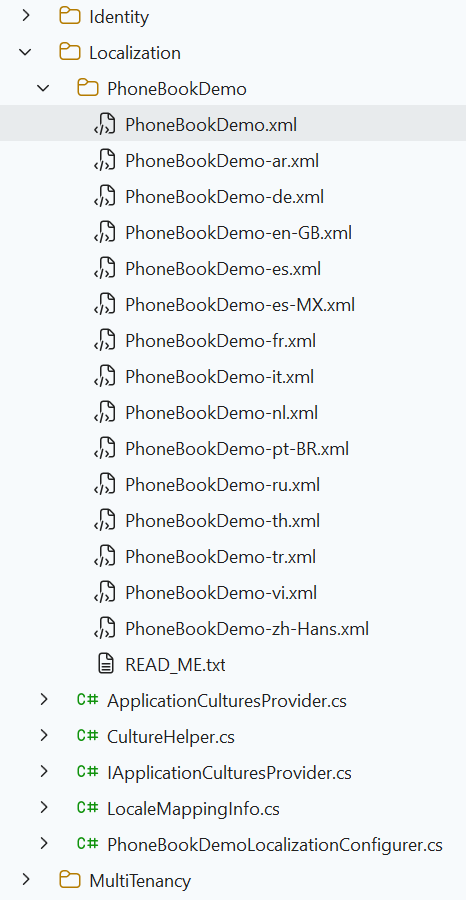
Open PhoneBookDemo.xml (the default, English localization dictionary) and add the following line:
<text name="PhoneBook">Phone Book</text>
<text name="PhoneBooksHeaderInfo">Phone Book Details</text>
If we don't define "PhoneBook"s value for other localization dictionaries, default value is shown in all languages. For example, we can define it also for Turkish in PhoneBookDmo-tr.xml file:
<text name="PhoneBook">Telefon Rehberi</text>
<text name="PhoneBooksHeaderInfo">Telefon Rehberi Detayları</text>
Note: Any change in server side (including change localization texts) requires recycle of the server application. We suggest to use Ctrl+F5 if you don't need to debugging for a faster startup. In that case, it's enough to make a re-build to recycle the application.
React Route
React has a powerful URL routing system. ASP.NET Zero has defined routes in a few places (for modularity, see main menu & layout). We want to add phone book page to the admin component. So, open src\routes\AppRouter.tsx in the client side and add a new route just below to the dashboard:
const AppRouter = () => {
  return (
    <Suspense fallback={<LoadingSpinner />}>
      <BrowserRouter>
        <Routes>
          <Route path="/app" element={<ProtectedRoute />}>
            <Route element={<AppLayout />}>
              {/* Other Routes */}
              <Route path="admin/phonebook" element={<PhoneBookPage />} />
            </Route>
          </Route>
        </Routes>
      </BrowserRouter>
    </Suspense>
  );
};
We get an error since we haven't defined PhonebookPage yet. Also, we ignored permission for now (will implement later).

