
Dynamic Property System
Dynamic Property System is a system that allows you to add and manage new properties on entity objects at runtime without any code changes. With this system, you can define dynamic properties on entity objects and perform operations on these objects easily. For example, it can be used for cities, counties, gender, status codes etc.
Check AspNet Boilerplate side of Dynamic Property System
Defining
First of all you need to define input types and entities you want to use with dynamic properties as described here
Then go to http://localhost:4200/app/admin/dynamic-property
Add Dynamic Properties that you need
Assign Dynamic Properties to your entity
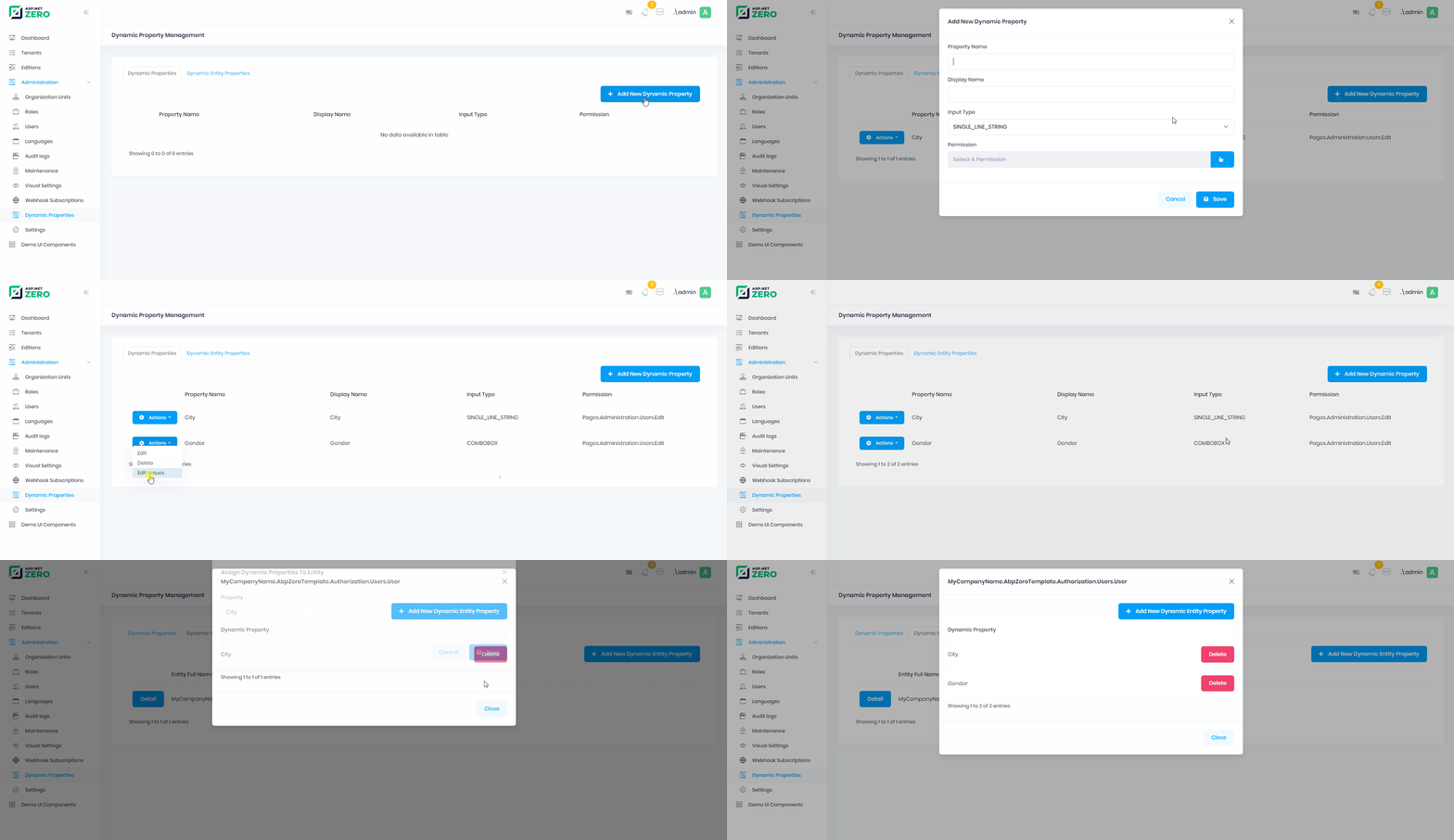
- Then you will be able to use dynamic property for the items of your entity.
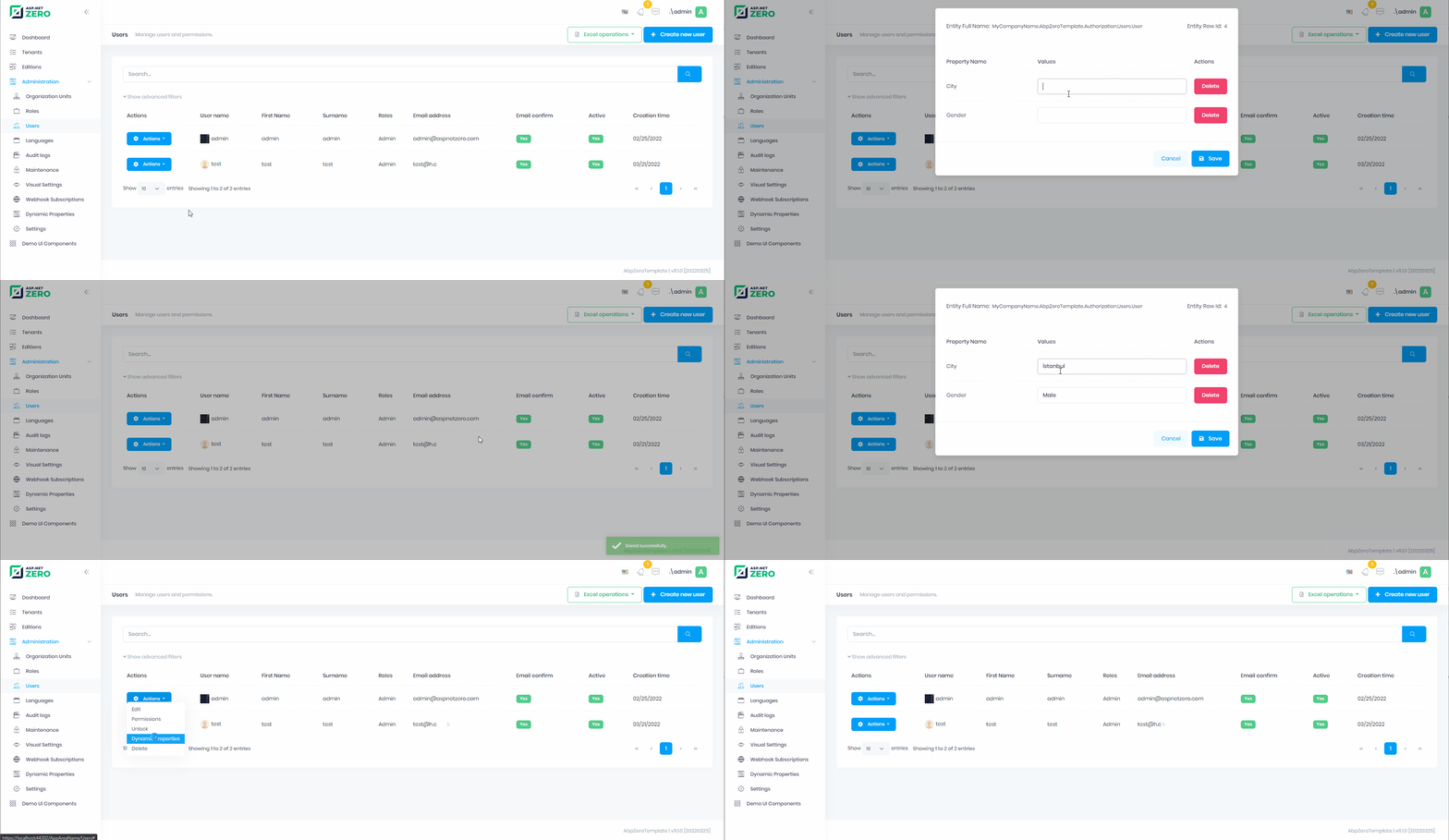
Managing Dynamic Properties of an Entity
You can navigate users to the dynamic property value management page using React Router. The route pattern is:
/app/admin/dynamic-entity-property-value/manage-all/:entityFullName/:rowId
Here's an example of adding a "Dynamic Properties" action to a user's action menu in users/index.tsx:
import { useNavigate } from "react-router-dom";
import { useServiceProxy } from "@/api/service-proxy-factory";
import {
  DynamicEntityPropertyDefinitionServiceProxy,
} from "@api/generated/service-proxies";

const UsersPage: React.FC = () => {
  const navigate = useNavigate();
  const dynamicEntityPropertyDefinitionService = useServiceProxy(
    DynamicEntityPropertyDefinitionServiceProxy,
    [],
  );

  // State to track if entity has dynamic properties
  const [entityHasDynamicProperties, setEntityHasDynamicProperties] = useState(false);

  // Check if the User entity has any dynamic properties assigned
  useEffect(() => {
    const checkDynamicProperties = async () => {
      const entities = await dynamicEntityPropertyDefinitionService.getAllEntities();
      const hasProperties = (entities ?? []).some(
        (e) => e === "MyCompanyName.AbpZeroTemplate.Authorization.Users.User"
      );
      setEntityHasDynamicProperties(hasProperties);
    };
    checkDynamicProperties();
  }, [dynamicEntityPropertyDefinitionService]);

  // Navigate to dynamic properties management page
  const showDynamicProperties = (user: UserListDto) => {
    navigate(
      `/app/admin/dynamic-entity-property-value/manage-all/MyCompanyName.AbpZeroTemplate.Authorization.Users.User/${user.id}`
    );
  };

  // Add to menu items
  const getMenuItems = (record: UserListDto) => {
    const items = [];

    // ... other menu items ...

    if (entityHasDynamicProperties) {
      items.push({
        key: "dynamicProperties",
        label: L("DynamicProperties"),
        onClick: () => showDynamicProperties(record),
      });
    }

    return items;
  };

  // ... rest of the component
};
Using DynamicPropertyValueManager Component Directly
You can also use the DynamicPropertyValueManager component directly in a modal or inline. The component is located at DynamicPropertyValueManager.tsx:
import { useRef } from "react";
import { Modal } from "antd";
import DynamicPropertyValueManager, {
  type DynamicPropertyValueManagerRef,
} from "@/pages/admin/dynamic-properties/dynami-entity-property-values/components/DynamicPropertyValueManager";
import L from "@/lib/L";

interface Props {
  visible: boolean;
  entityFullName: string;
  entityId: string;
  onClose: () => void;
}

const DynamicPropertiesModal: React.FC<Props> = ({
  visible,
  entityFullName,
  entityId,
  onClose,
}) => {
  const managerRef = useRef<DynamicPropertyValueManagerRef>(null);

  const handleSave = () => {
    managerRef.current?.saveAll();
    onClose();
  };

  return (
    <Modal
      title={L("DynamicProperties")}
      open={visible}
      onOk={handleSave}
      onCancel={onClose}
      width={800}
    >
      <DynamicPropertyValueManager
        ref={managerRef}
        entityFullName={entityFullName}
        entityId={entityId}
      />
    </Modal>
  );
};
| Property | Summary |
|---|---|
| PropertyName* | Unique name of the dynamic property |
| Input Type* | Input type name of the dynamic property |
| Permission | Required permission to manage anything about that property ( DynamicPropertyValue, EntityDynamicProperty, EntityDynamicPropertyValue) |

