
Solution Structure
Before reading this document, it's suggested to run the application and explore the user interface as described in the Getting Started document. This will help you to have a better understanding of the concepts defined here.
IDE & Operating System
It's suggested to use an IDE to develop your project. We suggest Visual Studio 2026+, but you can use Visual Studio Code or any other IDE/Editor you like. You can also use any OS (MacOS/Linux/Windows).
Architecture
The diagram below shows the overall architecture of the solutions:
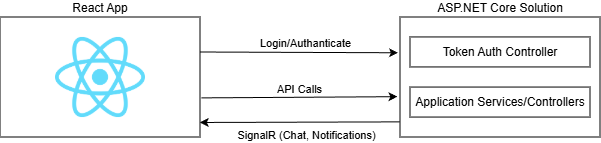
React project is designed so that it can be deployed separately from the backend ASP.NET Core solution, to a different port in the same server or to a different server. When it's deployed, it's actually a plain HTML+JS+CSS application that can be served on any operating system and any web server.
Note that ASP.NET Core solution does not have any HTML, JS or CSS code. It simply provides end points for token based authentication and to use the application services (REST APIs).
Server Side Solution Structure (Layers)
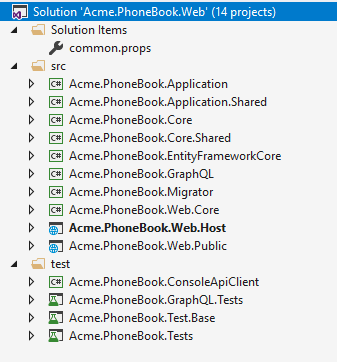
After you create and download your project, you have a solution structure as shown below for *.Web.sln:
There are two more solutions:
- *.Mobile.sln contains the MAUI projects
- *.All.sln contains both mobile and web development projects.
There are 12 projects in the solution:
- Core.Shared project contains
consts,enumsand helper classes used both in mobile & web projects. - Core project contains domain layer classes (like entities and domain services).
- Application.Shared project contains application service interfaces and DTOs.
- Application project contains application logic (like application services).
- EntityFrameworkCore project contains your DbContext, repository implementations, database migrations and other Entity Framework Core specific concepts.
- Web.Host project does not contain any web related files like HTML, CSS or JS. Instead, it just serves the application as remote API. So, any device can consume your application as API. For more information see Web.Host Project
- Web.Core project contains common classes used by MVC and Host projects.
- Web.Public project is a separated web application that can be used to create a public web site or a landing page for your application. For more information see Public Website.
- Migrator project is a console application that runs database migrations. For more information see Migrator Console Application
- ConsoleApiClient project is a simple console application for performing API requests to the application authenticated via OpenIddict.
- Tests project contains unit and integration tests.
Applications
ASP.NET Zero solution contains three applications:
Back End API (
Web.Host): An application to only serve the main application as REST API and does not provide any UI.Public Web Site (
Web.Public): This can be used to create a public web site or a landing page for your application.Migration Executer (
Migrator): Console application that runs database migrations.
Basic Configuration
appsettings.json in Web.Host project contains many settings but ServerRootAddress, ClientRootAddress and CorsOrigins are required to run the application:
"ServerRootAddress": "https://localhost:44301/",
"ClientRootAddress ": "http://localhost:4200/",
"CorsOrigins": "http://localhost:4200/"
ServerRootAddress is the URL of the server side Web.Host application, ClientRootAddress is the URL of the client side React application. CorsOrigins contains the URLs allowed to make cross-origin requests to Web.Host application.
For more information about configuring Web.Host application, see Features-Mvc-Core-Web-Host-Project.
Multi-Tenancy
Multi-tenancy is used to build SaaS (Software as a Service) applications easily. With this technique, we can deploy single application to serve to multiple customers. Each Tenant will have it's own roles, users, settings and other data.
ASP.NET Zero's code-base is developed to be multi-tenant. But, it can be disabled with a single line of configuration if you are developing a single-tenant application. When you disable it, all multi-tenancy stuff will be hidden. If multi-tenancy is disabled, there will be a single tenant named Default.
There are two types of perspective in multi-tenant applications:
- Host: Manages tenants and the system.
- Tenant: Uses the actual application features and pays for it.
For the CorsOrigins setting, you can use * character to allow all subdomains. For example:
"CorsOrigins": "http://*.app.mydomain.com/"
If you want to use {TENANCY_NAME} placeholder in your URLs, you also need to use it when configuring URLs for client side React app.
Thus, ASP.NET Zero can automatically detect current tenant from URLs. If you configure it as above, you should also redirect all subdomains to your application. To do that;
- You should configure DNS to redirect all subdomains to a static IP address. To declare 'all subdomains', you can use a wildcard e.g. *.mydomain.com.
- You should configure IIS to bind this static IP to your application.
There may be other ways of doing it but this is the simplest way.
In the development time, you don't need to use subdomains for tenants for a simpler development experience. When you do like that, a 'tenant switch' dialog is used to manually switch between tenants.
Check out the multi tenant documentation if you are building multi-tenant applications.
React Solution
Entry point is main.tsx; it runs AppPreBootstrap to handle some operations before rendering App and then loads the App.
Solution Folders
- public: This folder contains public assets for the applicaiton like JS, CSS and Images.
- src/api: This folder contains Backend API related classes like service proxies, HTTP Client etc...
- src/app: This folder contains the core application layer, including initialization (bootstrap) logic, global state management (Redux slices), internationalization setup, and the main application store configuration.
- src/hooks: This folder contains common Hooks for the application like Auth, Permissions and Localization.
- src/lib: This folder contains helper classes for the application.
- src/pages: This folder contains pages of the application.
- src/routes: This folder contains classes to configure routing of the application.
Next
- Web Application
- Mobile (MAUI) Application

