
Using GetPeople Method From React Component
Now, we can switch to the client side and use GetPeople method to show a list of people on the UI.
Service Proxy Generation
First, run (prefer Ctrl+F5 to be faster) the server side application (.Web.Host project). Then run nswag/refresh.bat file on the client side to re-generate service proxy classes (they are used to call server side service methods).
PhoneBookPage Typescript File
Change index.tsx as like below:
import L from "@/lib/L";
import React, { useEffect, useState } from "react";
import { Table } from "antd";
import type { ColumnsType } from "antd/es/table";
import PageHeader from "../components/common/PageHeader";
import { useTheme } from "@/hooks/useTheme";
import {
  PersonListDto,
  PersonServiceProxy,
  useServiceProxy,
} from "@/api/service-proxy-factory";

const PhoneBookPage: React.FC = () => {
  const { containerClass } = useTheme();
  const personService = useServiceProxy(PersonServiceProxy);

  const [people, setPeople] = useState<PersonListDto[]>([]);
  const [loading, setLoading] = useState<boolean>(false);
  const [filter, setFilter] = useState<string>("");

  useEffect(() => {
    getPeople();
  }, []);

  const getPeople = async (): Promise<void> => {
    setLoading(true);
    try {
      const result = await personService.getPeople(filter);
      setPeople(result.items || []);
    } finally {
      setLoading(false);
    }
  };

  const handleSearch = (e: React.FormEvent) => {
    e.preventDefault();
    getPeople();
  };

  const columns: ColumnsType<PersonListDto> = [
    {
      title: L("Name"),
      dataIndex: "name",
      key: "name",
      sorter: true,
      width: 150,
    },
    {
      title: L("Surname"),
      dataIndex: "surname",
      key: "surname",
      sorter: true,
      width: 150,
    },
    {
      title: L("EmailAddress"),
      dataIndex: "emailAddress",
      key: "emailAddress",
      sorter: true,
      width: 250,
    },
  ];

  return (
    <>
      <PageHeader
        title={L("PhoneBook")}
        description={L("PhoneBooksHeaderInfo")}
      />
      <div className={containerClass}>
        <div className="container-fluid">
          <div className="card card-custom gutter-b">
            <div className="card-body">
              <form className="form" autoComplete="off" onSubmit={handleSearch}>
                <div className="row align-items-center mb-4">
                  <div className="col-xl-12">
                    <div className="mb-5 m-form__group align-items-center">
                      <div className="input-group">
                        <input
                          value={filter}
                          name="filter"
                          autoFocus
                          className="form-control m-input"
                          placeholder={L("SearchWithThreeDot")!}
                          type="text"
                          onChange={(e) => setFilter(e.target.value)}
                        />
                        <button className="btn btn-primary" type="submit">
                          <i
                            className="flaticon-search-1"
                            aria-label={L("Search")!}
                          ></i>
                        </button>
                      </div>
                    </div>
                  </div>
                </div>
              </form>

              <Table
                rowKey={(record) => record.id!}
                size="small"
                bordered
                columns={columns}
                loading={loading}
                dataSource={people}
                pagination={false}
                scroll={{ x: true }}
              />
            </div>
          </div>
        </div>
      </div>
    </>
  );
};

export default PhoneBookPage;
We use useServiceProxy hook to get an instance of PersonServiceProxy, then call its getPeople method using async/await. We do this inside the useEffect hook which runs when the component mounts. The returned items are stored in the people state variable using the setPeople function.
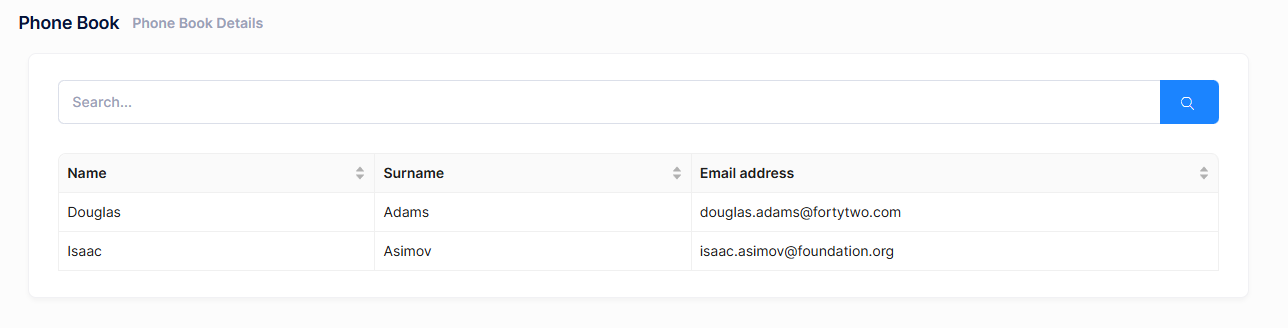
We successfully retrieved list of people from database to the page.
About Showing Tabular Data
We normally use a javascript based rich table/grid library to show tabular data, instead of manually rendering data like that. For example, we used Ant Design Table library to show users on the Users page of ASP.NET Zero. Always use such components since they make things much easier and provide a much better user experience.

