
Edit Mode For Phone Numbers
Final UI is shown below:
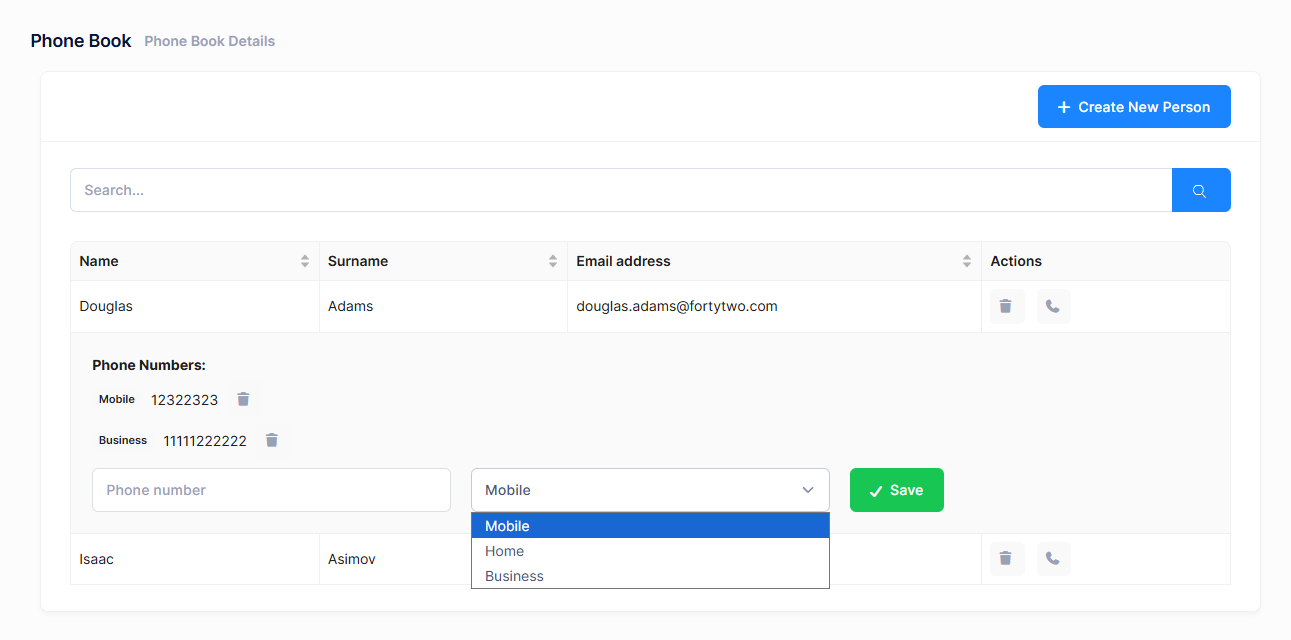
When we click the phone icon for a person, its row is expanded and all phone numbers are shown. Then we can delete any phone by clicking the delete icon. We can add a new phone from the inputs at the bottom of the expanded area.
PhoneBook Component
The main changes are in the index.tsx file. We added expandable rows to the Ant Design Table component to show phone numbers for each person.
State Management
const [expandedRowKeys, setExpandedRowKeys] = useState<number[]>([]);
const [newPhoneNumber, setNewPhoneNumber] = useState<string>("");
const [newPhoneType, setNewPhoneType] = useState<PhoneType>(PhoneType.Mobile);
Actions Column
The Actions column includes the phone button that toggles row expansion:
{
  title: L("Actions"),
  key: "actions",
  width: 150,
  render: (_text: string, record: PersonListDto) => (
    <>
      {isGranted("Pages.Administration.PhoneBook.DeletePerson") && (
        <button
          onClick={() => deletePerson(record)}
          title={L("Delete")!}
          className="btn btn-sm btn-icon btn-bg-light btn-active-color-danger me-2"
        >
          <i className="fa fa-trash"></i>
        </button>
      )}
      <button
        onClick={() => {
          const keys = expandedRowKeys.includes(record.id!)
            ? expandedRowKeys.filter((k) => k !== record.id)
            : [...expandedRowKeys, record.id!];
          setExpandedRowKeys(keys);
          setNewPhoneNumber("");
          setNewPhoneType(PhoneType.Mobile);
        }}
        title={L("AddPhone")!}
        className="btn btn-sm btn-icon btn-bg-light btn-active-color-primary"
      >
        <i className="fa fa-phone"></i>
      </button>
    </>
  ),
}
Expanded Row Render
The expanded row displays the phone list and add phone form:
const expandedRowRender = (record: PersonListDto) => {
  return (
    <div className="p-4">
      <div className="mb-3">
        <strong>{L("PhoneNumbers")}:</strong>
        <ul className="list-unstyled mt-2 mb-3">
          {record.phones && record.phones.length > 0 ? (
            record.phones.map((phone: PhoneInPersonListDto) => (
              <li key={phone.id} className="d-flex align-items-center gap-3 mt-2">
                <span className="badge bg-light text-dark">
                  {getPhoneTypeLabel(phone.type!)}
                </span>
                <span>{phone.number}</span>
                <button
                  className="btn btn-sm btn-icon btn-bg-light btn-active-color-danger"
                  title={L("Delete")!}
                  onClick={() => deletePhone(phone.id!, record.id!)}
                >
                  <i className="fa fa-trash"></i>
                </button>
              </li>
            ))
          ) : (
            <li>{L("NoPhoneNumbersFound")}</li>
          )}
        </ul>
      </div>

      <div className="row">
        <div className="col-md-4">
          <input
            value={newPhoneNumber}
            onChange={(e) => setNewPhoneNumber(e.target.value)}
            placeholder={L("PhoneNumber")!}
            className="form-control"
          />
        </div>
        <div className="col-md-4">
          <select
            value={newPhoneType}
            onChange={(e) => setNewPhoneType(Number(e.target.value))}
            className="form-select"
          >
            <option value={PhoneType.Mobile}>{L("PhoneType_Mobile")}</option>
            <option value={PhoneType.Home}>{L("PhoneType_Home")}</option>
            <option value={PhoneType.Business}>{L("PhoneType_Business")}</option>
          </select>
        </div>
        <div className="col-md-4">
          <button
            className="btn btn-success"
            onClick={() => addPhone(record.id!)}
          >
            <i className="fa fa-check"></i> {L("Save")}
          </button>
        </div>
      </div>
    </div>
  );
};
Table Configuration
The Table component is configured with the expandable prop:
<Table
  rowKey={(record) => record.id!}
  size="small"
  bordered
  columns={columns}
  loading={loading}
  dataSource={people}
  pagination={false}
  scroll={{ x: true }}
  expandable={{
    expandedRowKeys: expandedRowKeys,
    expandedRowRender: expandedRowRender,
    showExpandColumn: false,
    onExpand: (expanded, record) => {
      const keys = expanded
        ? [...expandedRowKeys, record.id!]
        : expandedRowKeys.filter((k) => k !== record.id);
      setExpandedRowKeys(keys);
    },
  }}
/>
Phone Management Functions
Functions to add and delete phone numbers:
const addPhone = async (personId: number) => {
  if (!newPhoneNumber.trim()) {
    abp.notify.warn(L("PhoneNumberRequired"));
    return;
  }

  const input = new AddPhoneInput({
      personId: personId,
      number: newPhoneNumber,
      type: newPhoneType,
    });
    await personService.addPhone(input);
    abp.notify.success(L("PhoneSuccessfullyAdded"));
    setNewPhoneNumber("");
    setNewPhoneType(PhoneType.Mobile);
    setExpandedRowKeys([]);
    getPeople();
};

const deletePhone = (phoneId: number, personId: number) => {
  modal.confirm({
    title: L("AreYouSure"),
    content: L("PhoneDeleteWarningMessage"),
    okText: L("Yes"),
    cancelText: L("Cancel"),
    onOk: async () => {
        await personService.deletePhone(phoneId);
            abp.notify.success(L("SuccessfullyDeleted"));
            setPeople((prevPeople) =>
            prevPeople.map((p) => {
                if (p.id === personId && p.phones) {
                p.phones = p.phones.filter((phone) => phone.id !== phoneId);
                }
                return p;
            })
        );
    },
  });
};

const getPhoneTypeLabel = (type: PhoneType): string => {
  switch (type) {
    case PhoneType.Mobile:
      return L("PhoneType_Mobile");
    case PhoneType.Home:
      return L("PhoneType_Home");
    case PhoneType.Business:
      return L("PhoneType_Business");
    default:
      return "";
  }
};
Localization
Add these localization strings to your PhoneBookDemo.xml file:
<text name="AddPhone">Add Phone</text>
<text name="PhoneNumbers">Phone Numbers</text>
<text name="NoPhoneNumbersFound">This person has no phone numbers.</text>
<text name="PhoneDeleteWarningMessage">Are you sure you want to delete this phone number?</text>
<text name="PhoneSuccessfullyAdded">Phone number successfully added</text>
<text name="PhoneNumberRequired">Phone number is required</text>
<text name="PhoneType_Mobile">Mobile</text>
<text name="PhoneType_Home">Home</text>
<text name="PhoneType_Business">Business</text>
