
Deleting a Person
Let's add a delete button in people list as shown below:
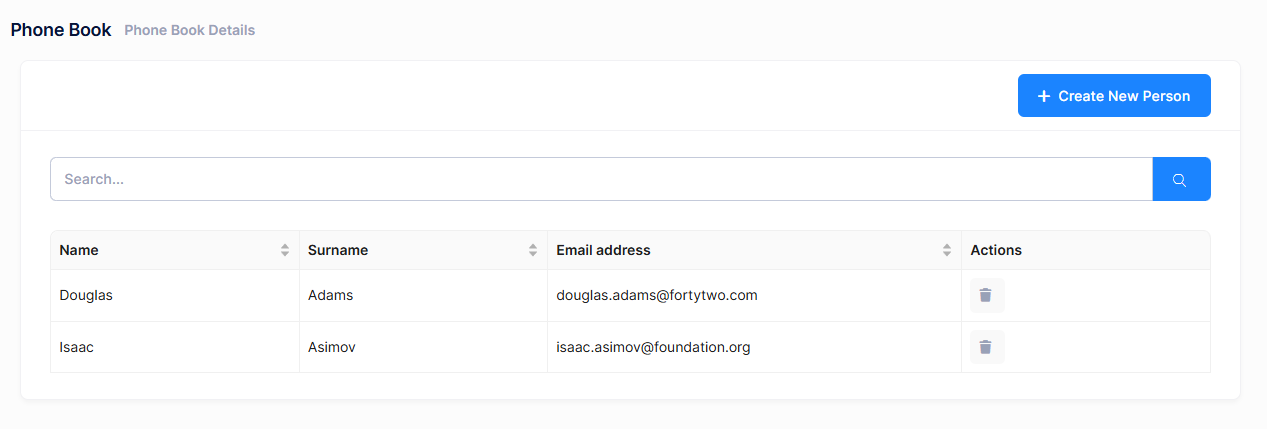
We're starting from UI in this case.
View
We're changing index.tsx to add a delete button in the Actions column. First, we need to add the Ant Design App hook for modal confirmations and update the columns definition:
import L from "@/lib/L";
import React, { useEffect, useState } from "react";
import { Table, App } from "antd";
import type { ColumnsType } from "antd/es/table";
import PageHeader from "../components/common/PageHeader";
import { useTheme } from "@/hooks/useTheme";
import { usePermissions } from "@/hooks/usePermissions";
import {
  PersonListDto,
  PersonServiceProxy,
  useServiceProxy,
} from "@/api/service-proxy-factory";
import CreatePersonModal from "./CreatePersonModal";

const PhoneBookPage: React.FC = () => {
  const { modal } = App.useApp(); // Add this line for modal.confirm
  const personService = useServiceProxy(PersonServiceProxy);

  // Other Code

  const deletePerson = (person: PersonListDto) => {
    modal.confirm({
      title: L("AreYouSure"),
      content: L("PersonDeleteWarningMessage", person.name),
      okText: L("Yes"),
      cancelText: L("Cancel"),
      onOk: async () => {
        await personService.deletePerson(person.id);
        abp.notify.success(L("SuccessfullyDeleted"));
        setPeople((prevPeople) => prevPeople.filter((p) => p.id !== person.id));
      },
    });
  };

  const columns: ColumnsType<PersonListDto> = [
    {
      title: L("Name"),
      dataIndex: "name",
      key: "name",
      sorter: true,
      width: 150,
    },
    {
      title: L("Surname"),
      dataIndex: "surname",
      key: "surname",
      sorter: true,
      width: 150,
    },
    {
      title: L("EmailAddress"),
      dataIndex: "emailAddress",
      key: "emailAddress",
      sorter: true,
      width: 250,
    },
    {
      title: L("Actions"),
      key: "actions",
      width: 150,
      render: (_text: string, record: PersonListDto) => (
        <>
          {isGranted("Pages.Administration.PhoneBook.DeletePerson") && (
            <button
              onClick={() => deletePerson(record)}
              title={L("Delete")!}
              className="btn btn-sm btn-icon btn-bg-light btn-active-color-danger"
            >
              <i className="fa fa-trash"></i>
            </button>
          )}
        </>
      ),
    },
  ];

  // Rest of The Component
};

export default PhoneBookPage;
We simply added an Actions column with a delete button that calls deletePerson method when clicked. The button is conditionally rendered based on the delete permission.
Style
React components in this project use inline styles or CSS classes from Bootstrap and Metronic theme. No separate CSS file is needed for this feature.
If you need custom styles, you can create a styles.css file in the phonebook folder:
/* Custom styles for phonebook */
.phonebook-actions {
  display: flex;
  gap: 8px;
}
And import it in your component:
import "./styles.css";
Application Service
Let's leave the client side and add a DeletePerson method to the server side. We are adding it to the service interface, IPersonAppService:
Task DeletePerson(EntityDto input);
EntityDto is a shortcut of ABP if we only get an id value. Implementation (in PersonAppService) is very simple:
[AbpAuthorize(AppPermissions.Pages_Administration_PhoneBook_DeletePerson)]
public async Task DeletePerson(EntityDto input)
{
    await _personRepository.DeleteAsync(input.Id);
}
Define the Delete Permission
In this example, we are creating a child permission under an existing phoneBook permission. This allows for more granular control, such as managing delete operations separately.
A permission should have a unique name. We define permission names as constant strings in AppPermissions class. It's a simple constant string:
public const string Pages_Administration_PhoneBook_DeletePerson = "Pages.Administration.PhoneBook.DeletePerson";
To define delete permission, use the AppAuthorizationProvider class as shown below:
phoneBook.CreateChildPermission(AppPermissions.Pages_Administration_PhoneBook_DeletePerson, L("DeletePerson"));
Service Proxy Generation
Since we changed server side services, we should re-generate the client side service proxies via NSwag. Make server side running and use refresh.bat (located in nswag/ folder) as we did before.
cd nswag
refresh.bat
This will update the src/api/generated/service-proxies.ts file with the new deletePerson method.
React Component Implementation
The key parts of the React implementation:
Using Ant Design Modal for Confirmation
const { modal } = App.useApp();
We use Ant Design's App.useApp() hook to access the modal context, which provides a cleaner way to show confirmation dialogs.
Delete Function
const deletePerson = (person: PersonListDto) => {
  modal.confirm({
    title: L("AreYouSure"),
    content: L("PersonDeleteWarningMessage", person.name),
    okText: L("Yes"),
    cancelText: L("Cancel"),
    onOk: async () => {
        await personService.deletePerson(person.id);
        abp.notify.success(L("SuccessfullyDeleted"));
        setPeople((prevPeople) => prevPeople.filter((p) => p.id !== person.id));
    },
  });
};
This function:
- Shows a confirmation modal with the person's name
- If confirmed, calls the backend
deletePersonmethod - On success, shows a notification and removes the person from the state
- Handles errors gracefully
State Update
We use React's functional state update:
setPeople((prevPeople) => prevPeople.filter((p) => p.id !== person.id));
This ensures the state update is based on the latest state value.
Localization
Open PhoneBookDemo.xml (the default, English localization dictionary) in your server-side project and add the following line:
<text name="PersonDeleteWarningMessage">Are you sure you want to delete {0}? This action cannot be undone.</text>
The {0} placeholder will be replaced with the person's name when calling L("PersonDeleteWarningMessage", person.name).
Confirmation Dialog
When you click the delete button, it shows a confirmation message:
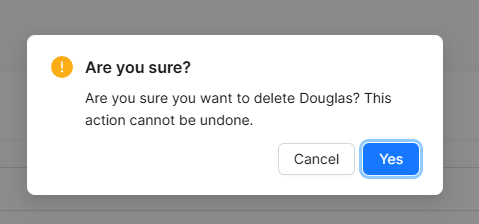
If you click OK, it calls the deletePerson method of PersonServiceProxy and shows a success notification. The person is also removed from the table immediately without requiring a page refresh.
