
Social Logins
ASP.NET Zero supports social media logins. To enable it, we should change the following settings in appsettings.json file.
  "Authentication": {
    "AllowSocialLoginSettingsPerTenant": false,
    "Facebook": {
      "IsEnabled": "false",
      "AppId": "",
      "AppSecret": ""
    },
    "Google": {
      "IsEnabled": "false",
      "ClientId": "",
      "ClientSecret": ""
    },
    "Twitter": {
      "IsEnabled": "false",
      "ConsumerKey": "",
      "ConsumerSecret": ""
    },
    "Microsoft": {
      "IsEnabled": "false",
      "ConsumerKey": "",
      "ConsumerSecret": ""
    }
  },
You can find many documents on the web to learn how to obtain authentication keys for social platforms. So, we will not go to details of creating apps on social medias. Once you get your keys, you can write
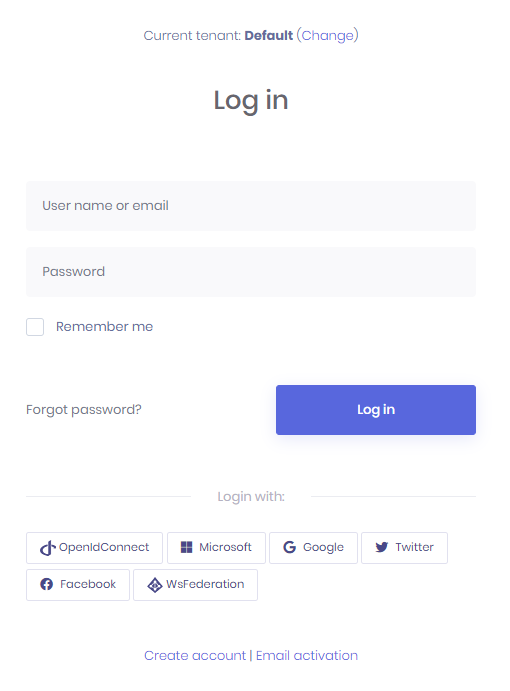
them into appsettings.json. When you enable it, social media logos are automatically shown on the login page as shown below:
Social Login Settings Per Tenant
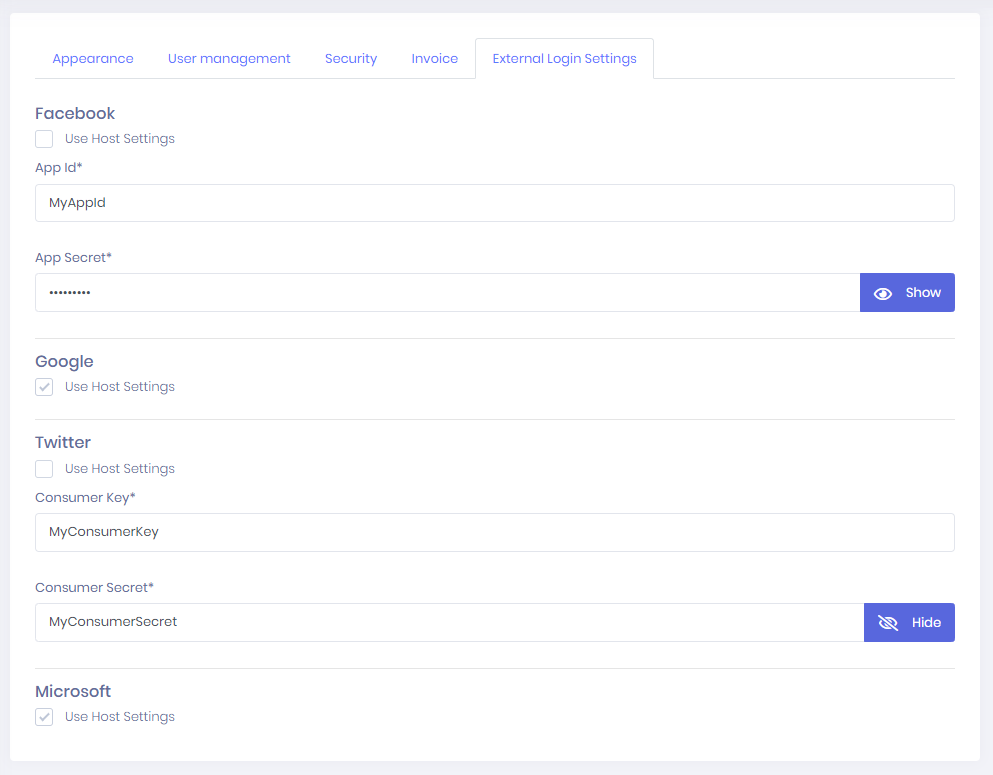
You can allow tenants to change social logins settings. To enable it you should set AllowSocialLoginSettingsPerTenant to true in appsettings.json
"AllowSocialLoginSettingsPerTenant": true
Then your tenant will be able to change their social login settings. If tenants don't set it, host settings will be used.
OpenId Connect Login
In addition to social logins, ASP.NET Zero includes OpenId Connect Login integrated. It's configuration can be changed in appsettings.json
"OpenId": {
  "IsEnabled": "false",
  "ClientId": "",
  "ClientSecret": "",
  "Authority": "",
  "LoginUrl": "",
  "ValidateIssuer": "true",
  "ResponseType": "code",
  "ClaimsMapping": []
}
ResponseType defines which OpenID Connect flow ASP.NET Zero will use. You can configure it in appsettings.json or from the host/tenant settings page when social login settings per tenant are enabled.
- Use
code(recommended/default) for Authorization Code Flow. The provider must allow authorization code flow, the MVC application's OpenID Connect callback URL must be added to the provider's redirect URIs, and the token endpoint must return anid_token. SetClientSecretif your provider requires it. - Use
id_tokenonly if your provider supports implicit ID token flow. In this mode, the provider returns theid_tokendirectly to the MVC application, so the provider must be configured to issue ID tokens with the user claims required by ASP.NET Zero.
In some cases, OpenId Connect provider doesn't return claims we want to use. For example, Azure AD doesn't return "nameidentifier" claim but ASP.NET Core Identity uses it to find id of the user. So, in such cases, we can use ClaimsMapping to map claims of provider to custom claims. AspNet Zero will find the claim with key and will map it to internal claim with claim value in the mapping. For the following configuration, external objectidentifier will be mapped to internal nameidentifier claim.
"ClaimsMapping": [
  {
    "claim": "http://schemas.xmlsoap.org/ws/2005/05/identity/claims/nameidentifier",
    "key": "id"
  },
  {
    "claim": "http://schemas.xmlsoap.org/ws/2005/05/identity/claims/name",
    "key": "name"
  },
  {
    "claim": "http://schemas.xmlsoap.org/ws/2005/05/identity/claims/givenname",
    "key": "given_name"
  },
  {
    "claim": "http://schemas.xmlsoap.org/ws/2005/05/identity/claims/surname",
    "key": "family_name"
  },
  {
    "claim": "http://schemas.xmlsoap.org/ws/2005/05/identity/claims/emailaddress",
    "key": "email"
  }
]
If you are using Azure AD for OpenID Connect and your app is multi-tenant on Azure side, then you need to disable issuer validation, so all Azure AD users can use your app. Note that, multi-tenant app here is the one you have created on your Azure portal, it is not related to AspNet Zero's multi-tenant feature.
"ValidateIssuer": "false"


